Close
0%
0%

MP148: Ultra-Low-Cost to Add voice to any project!

Add voice to any project! 0.5W speaker drive, 25µA standby, serial reprogramming—no tools needed. Perfect for IoT, toys, and alarms.

Similar projects worth following
397 views
1. Overview What is the MP148? A ready-to-use module built around the KT148A 32-bit DSP voice chip (SOP8 package). Key features: 420KB storage (up to 400s audio at 8KHz). Direct 0.5W speaker drive (no amplifier needed). Serial reprogramming via USB-to-TTL (no expensive tools). Ultra-low power: 25µA standby, 1.7µA shutdown. Perfect for: Smart toys, industrial alarms, accessibility devices, and IoT voice prompts. Image: Side-by-side comparison of MP148 module vs. raw KT148A chip. 2. Hardware Setup Components (Pre-linked to Hackster’s database): Hardware Notes MP148 Voice Module [Link to store/Aliexpress] USB-to-TTL (CH340G) For voice uploads 8Ω 0.5W Speaker Non-polarized 3.3V–5V Power Supply Lithium battery or USB-powered Wiring Diagram: MP148 Pinout: - VBAT (Pin 8) → 5V - GND (Pin 1) → Ground - PB9 (Pin 2) → CH340G RX - PB1 (Pin 3) → CH340G TX - SPK1/SPK2 → Speaker Image: Breadboard setup with labeled connections.
1. Overview

What is the MP148?

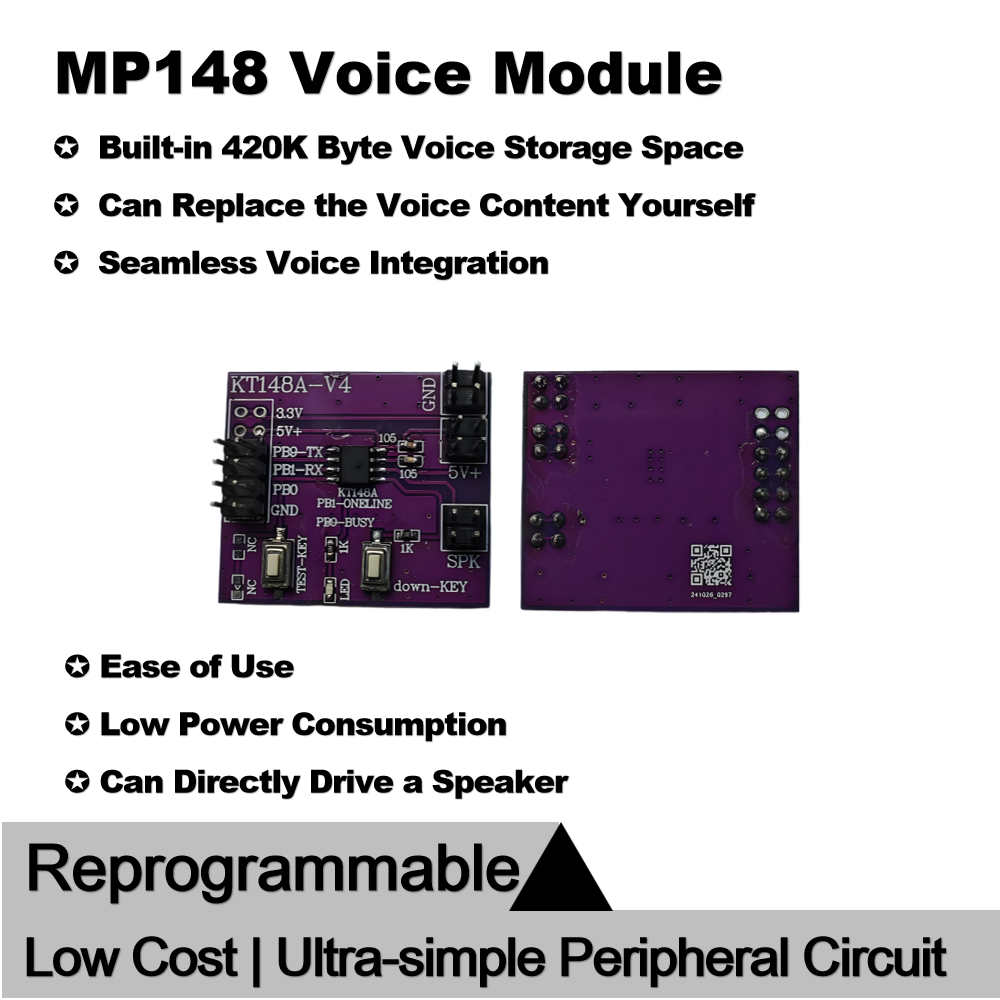
  • A ready-to-use module built around the KT148A 32-bit DSP voice chip (SOP8 package).
  • Key features:
    • 420KB storage (up to 400s audio at 8KHz).
    • Direct 0.5W speaker drive (no amplifier needed).
    • Serial reprogramming via USB-to-TTL (no expensive tools).
    • Ultra-low power: 25µA standby, 1.7µA shutdown.

Perfect for:

  • Smart toys, industrial alarms, accessibility devices, and IoT voice prompts.

Image: Side-by-side comparison of MP148 module vs. raw KT148A chip.

2. Hardware Setup

HardwareNotes
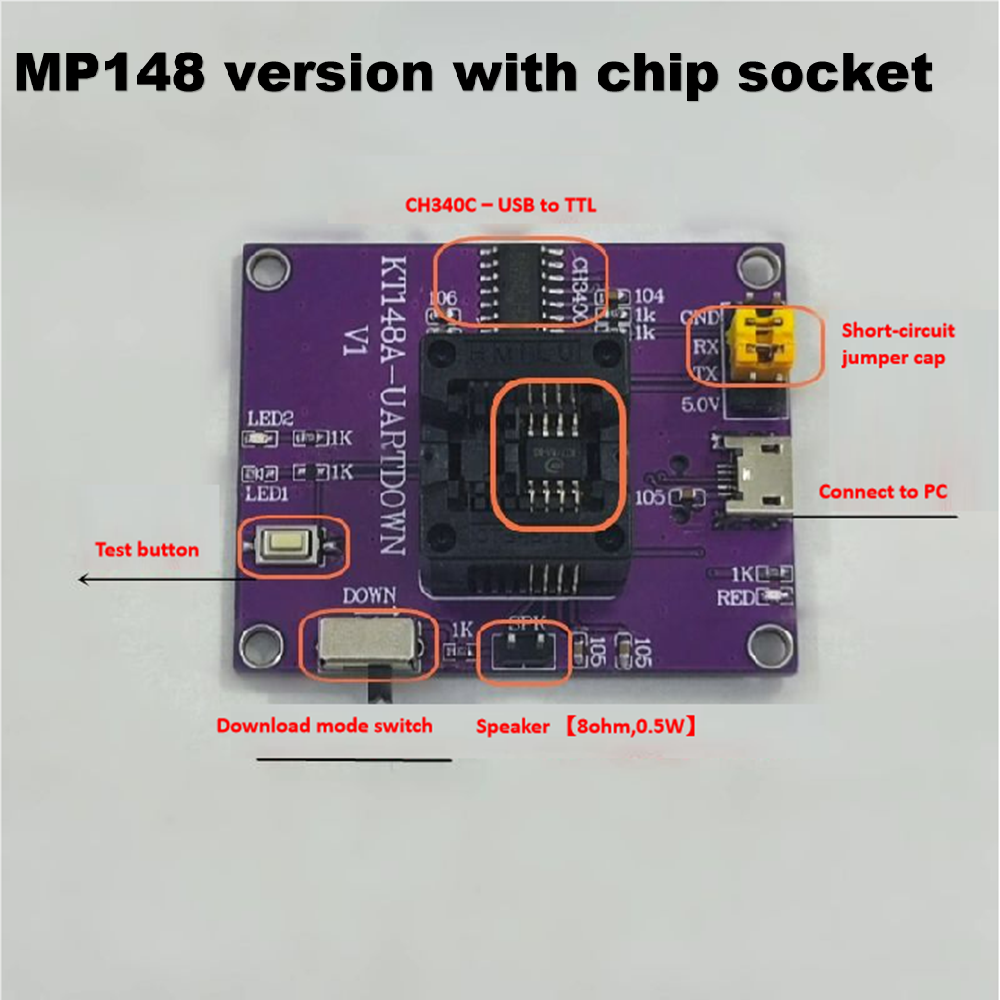
MP148 Voice Module[https://www.aliexpress.com/item/1005009084565910.html]
USB-to-TTL (CH340G)For voice uploads
8Ω 0.5W SpeakerNon-polarized
3.3V–5V Power SupplyLithium battery or USB-powered

Wiring Diagram:

MP148 Pinout: 

 - VBAT (Pin 8) → 5V 

 - GND (Pin 1) → Ground 

 - PB9 (Pin 2) → CH340G RX 

 - PB1 (Pin 3) → CH340G TX 

 - SPK1/SPK2 → Speaker

Image: Breadboard setup with labeled connections.

3. Voice Upload Tutorial

Step 1: Prepare Audio Files

  • Convert WAV/MP3 to .F1A format using the provided tool (Audio Compression Tool 1.2.17).
    • Tip: Use 16KHz sampling for best quality.

Step 2: Enter Download Mode

  • Hold Pin 5 (SPK1) to ground while powering on. Release after "beep."

Step 3: Upload via Serial Tool

  1. Connect CH340G to MP148 (TX/RX crossed).
  2. Open VoiceCom_V8.exe, select COM port (115200 baud).
  3. Load .F1A files → Click "Download All."

4. Control Methods

Option 1: One-Wire Serial (For MCUs)

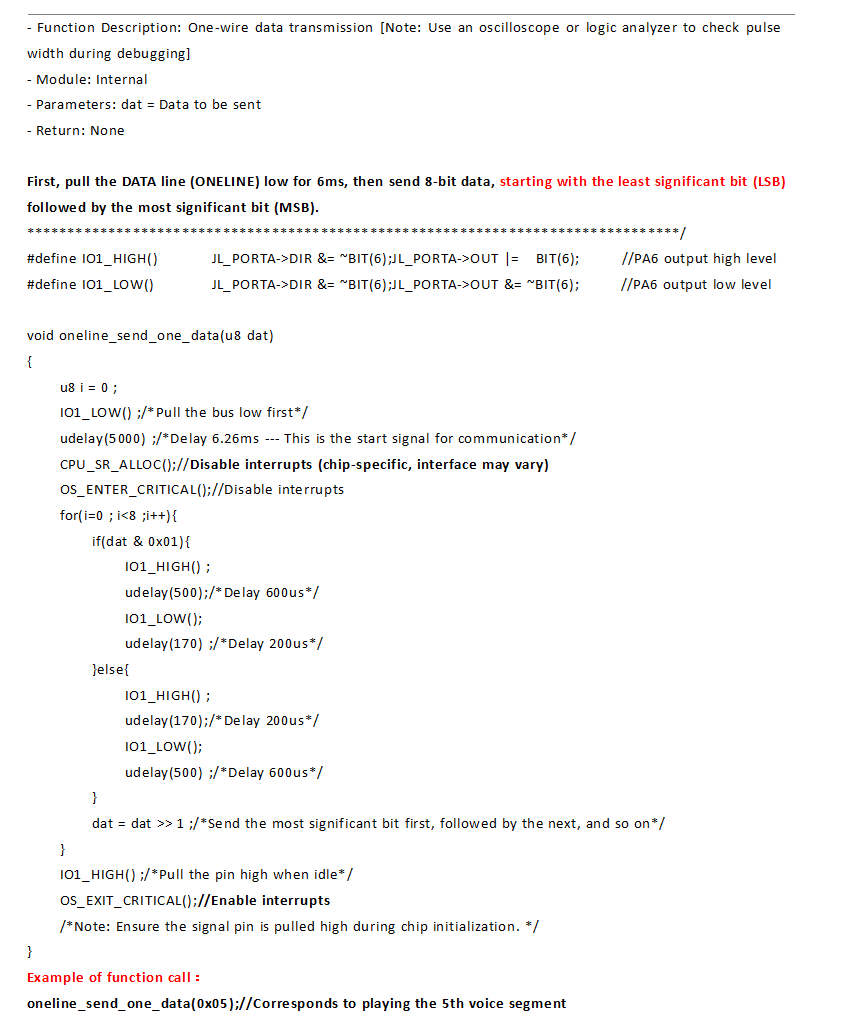
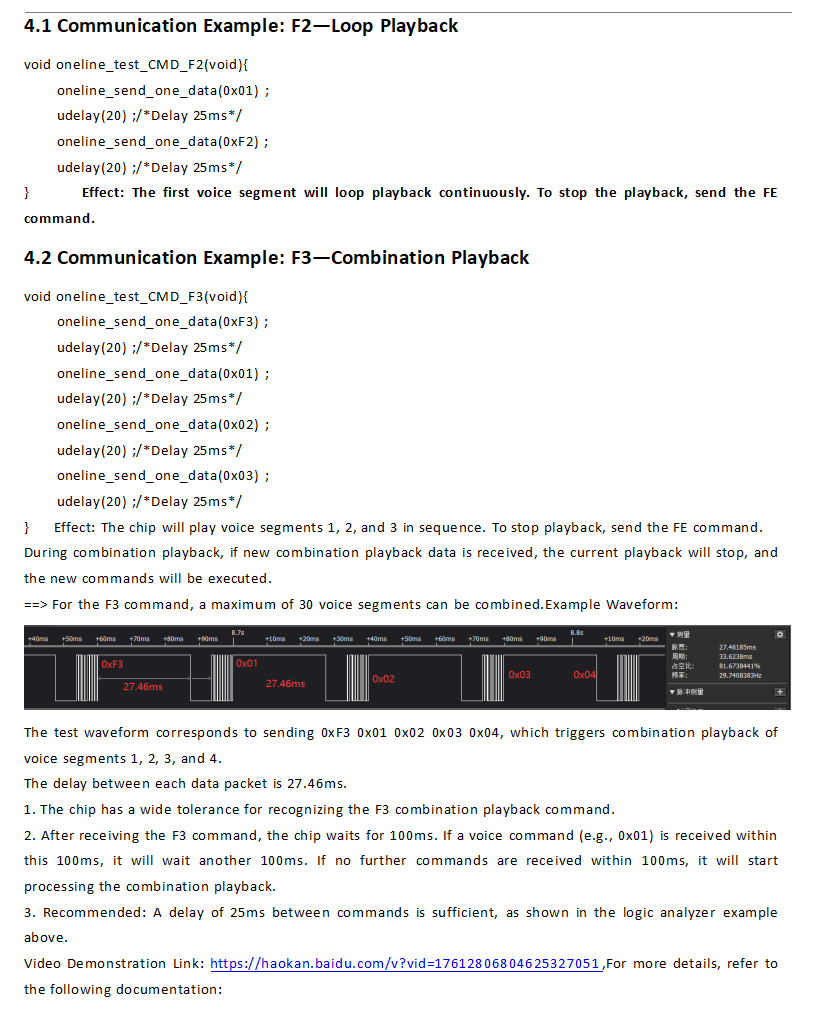
  • Send commands like 0x01 (play voice 1) or 0xF3 (combination playback).
  • Example Arduino code:cpp
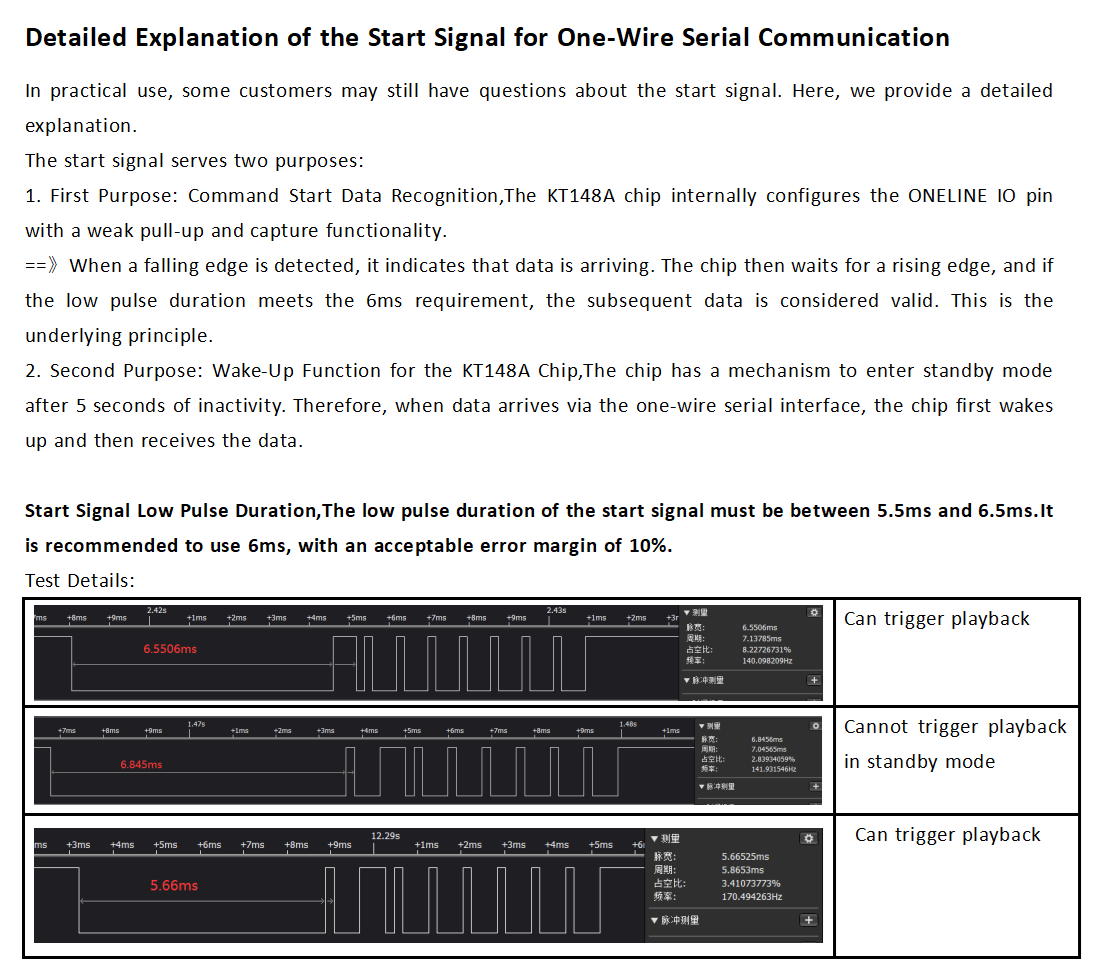
    void playVoice(int voiceNum) {    digitalWrite(ONELINE_PIN, LOW);    delayMicroseconds(6000); // Start pulse    for (int i = 0; i < 8; i++) {      // Send LSB-first data (simplified)    }  }  

Option 2: Button Trigger

  • Ground Pin 4 (PB0) to play next voice segment.

5. Advanced Features

  • Ultra-Low Power Mode: Send 0xF0 to reduce power to 1.7µA. Wake via 40ms low pulse.
  • Volume Control: 15 levels (0xE0–0xEF).
  • Combination Playback: Chain up to 30 voices with 0xF3.

6. Troubleshooting & FAQ

Q: No sound after upload?

  • Verify Pin 5 is floating (not grounded) during normal operation.

Q: Audio choppy?

  • Add a 10µF capacitor between VBAT and GND for stable power.

Q: Need louder output?

  • Use larger speakers (up to 8Ω 2W) or external amps (e.g., HAA8002D).
MP148 Voice Module Reference Schematic-SOP8_V4.pdf

Adobe Portable Document Format - 639.01 kB - 08/10/2025 at 08:06

Preview

KT148A FAQ Collection 2_Updated to 46.pdf

Adobe Portable Document Format - 3.23 MB - 08/10/2025 at 08:06

Preview

KT148A Voice Chip User Manual-SOP8_V5.pdf

Adobe Portable Document Format - 3.49 MB - 08/10/2025 at 08:06

Preview

  • MP148 Voice Module Technical Data

    Junluan • 08/10/2025 at 08:08 • 0 comments

    # MP148 Voice Module Technical Data README

    ## Overview
    The MP148 module is the minimal system for the KT148A voice chip, fully demonstrating all functionalities of the KT148A. As such, all technical documentation for the KT148A voice chip is applicable to the MP148 module.

    ## Technical Details
    For in-depth understanding of the MP148 module’s underlying hardware and software design, as well as details on serial port command control, key-based control, or to unlock more flexible and customized functionalities, refer to the *99_KT148A Voice Chip Complete Data Package_V5_20231212*.

    ## Getting Started
    If you are focused on using the module’s features without delving into the underlying implementation logic, our demonstration videos and product manuals are sufficient for quick onboarding and practical use.

    ## Additional Information
    For specific configuration functions, serial port commands, or considerations for mass production, you can directly search for relevant keywords in the *99_KT148A Voice Chip Complete Data Package_V5_20231212*.

    ### Note on Terminology
    In the *99_KT148A Voice Chip Complete Data Package_V5_20231212*, terms such as “test board,” “test demo,” or “test module” refer to the MP148 module. These are unified under a single naming convention within the documentation.

    ## Module Maturity
    With the widespread application and large-scale shipments of the KT148A voice chip, the MP148 voice module has undergone several iterations. It is now highly stable and mature, enabling thousands of users to rapidly transition from prototyping to mass production.

    For further details, consult the *99_KT148A Voice Chip Complete Data Package_V5_20231212* or contact our support team.

View project log

Enjoy this project?

Share

Discussions

Similar Projects

Does this project spark your interest?

Become a member to follow this project and never miss any updates