 Vladimir Tsibrov
I've written about the video player before. But I was working on other things in parallel too — in particular, building out the file manager: added a context menu, copy, delete, create directory, and so on. A lot of these operations meant talking to the user: entering some text, confirming things like "delete this file? yes/no." And in the code that turned into a separate chunk of UI for every single operation.
I didn't have a ready-made set of widgets. Every task rolled its own buttons and fields: drew them, parsed key presses, assembled dialogs out of them. Which, of course, scaled terribly — the more tasks, the more copy-pasted code written from scratch.
The fix was obvious: I needed an engine that hands tasks a ready-made tool for building interfaces. The task describes what it wants to show, and everything else — drawing, key handling, focus switching, dispatching events — is handled by one shared mechanism.
But there was a second thing, and it turned out to be the bigger one.
The device was originally meant to be single-tasking, with each task owning its own screen. As long as that was its territory, everything was predictable: it decides when and what to draw.
Then the dirty-rows mechanism and the lcd.service() method came along, and part of the job moved to the shell. Now the shell has to be called regularly, no matter what the current task is doing. And a single-tasking model gives you no such guarantee: if a task doesn't return control, the shell can't service the display, and the rows just stay undrawn.
Easiest to show with an example. File manager operations — copy, delete — needed user confirmation. In code that was a blocking loop: the task sat there until the user hit "yes" or "no." And the whole time, the shell got no control and couldn't call lcd.service().
I could technically have stuck a service() call into every long loop, but that's a hack: by design the shell should get control on time, and the shell is what calls service() — not the task.
So I went looking for other options. I looked at coroutines, but quickly realized that wasn't it. Their model makes the task track where it yields and mark those spots with macros. What I wanted was for task code to read like plain sequential code and not care what other tasks are doing. So I dropped coroutines pretty much immediately.
In the end I landed on FreeRTOS.
Switching to FreeRTOS and building the UI engine wasn't a patch job — it was an architecture change. So the project had to be rewritten from scratch, and I started with the UI engine.
First came the basic widgets: button, checkbox, input field. I used them to debug all the mechanics: how a widget is created, how it takes focus, how it redraws, how it reports events — its whole lifecycle. The structure came together along the way: the form as a container, owner of the widgets and the access point to them for the UI engine, plus a stack of forms on top, so a task can open new screens over the current ones.
Now a task could throw an interface together from ready-made widgets. But it also needed a set of standard dialogs: message box, value input, and the "open" and "save" file dialogs.
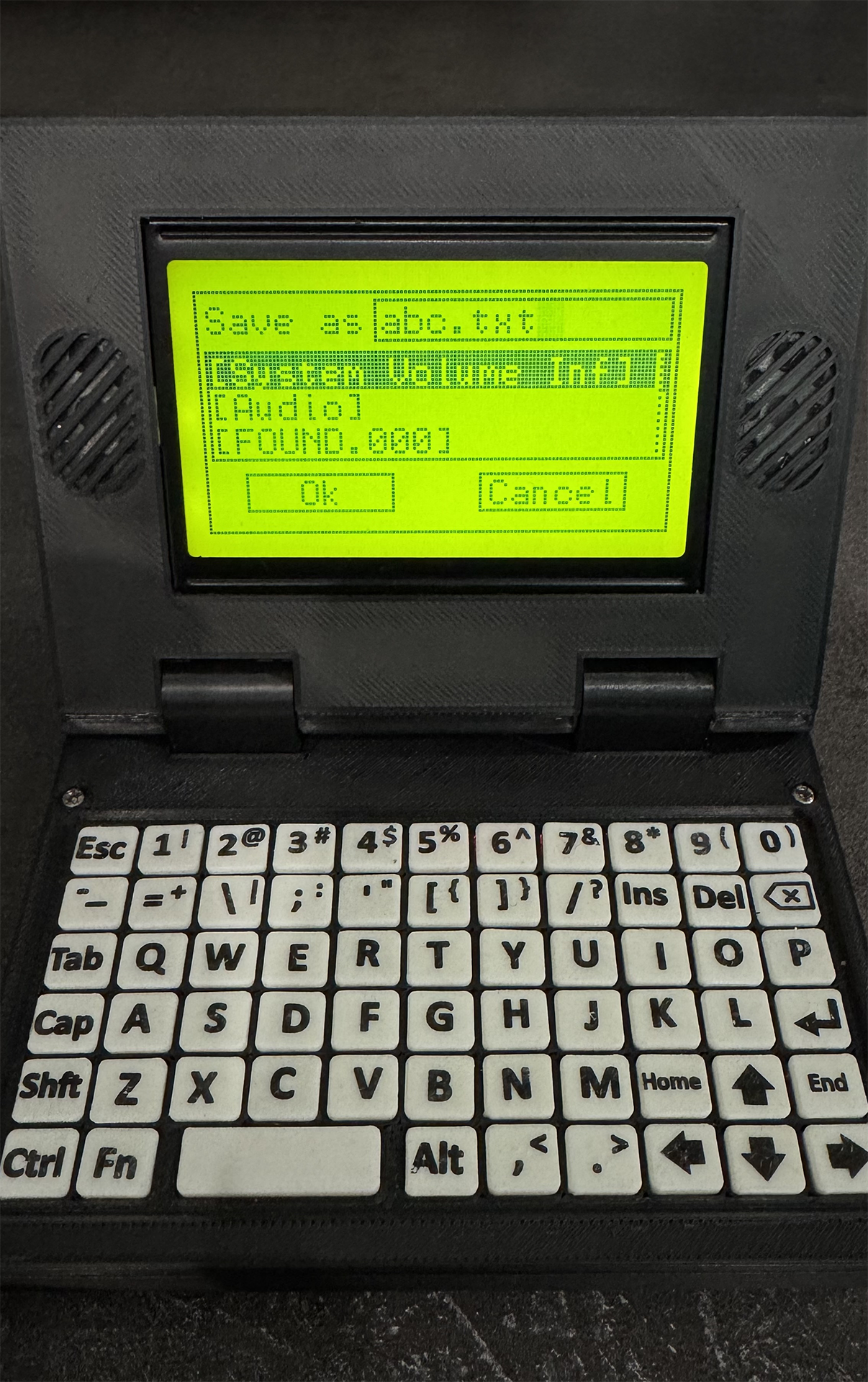
Alongside the UI engine I was reworking the rest of the code. FreeRTOS dragged edits through the entire project — it touched literally everything where the code assumed only one scenario was ever running.
There were a lot of those places. At times it felt like I was writing code and making progress, when really I was just getting further from the finish line, because new wrinkles kept popping up.
Memory deserves its own mention. In the single-tasking system there was plenty, and I never thought about SRAM. Now I was pinching bytes everywhere: shrinking task stacks, reworking data structures, hunting for whatever else could go. Every task had to get by on the bare minimum.
As for multitasking — FreeRTOS fixed the blocking loops and the lcd.service() call, but the user still couldn't see any of it. I only really got to "feel" it once I implemented Alt+Tab task switching. The shell catches the combo and builds a list of running tasks to draw over the current content. But the active task keeps drawing meanwhile and would wipe that list. So I had to build an overlay mechanism.
Here's how it works. The shell sees Alt+Tab and temporarily blocks task switching so nothing interrupts it while it draws the list. Then it draws the list over the current content, copies the video buffer fragment containing the list into a separate structure, and restores the video buffer to what it was before. Task switching is allowed again. From then on the fragment lives separately from the video buffer. It only gets mixed in when rows go out to the display.
I later reused the same mechanism in the video player, for the volume level and the scroll bar.
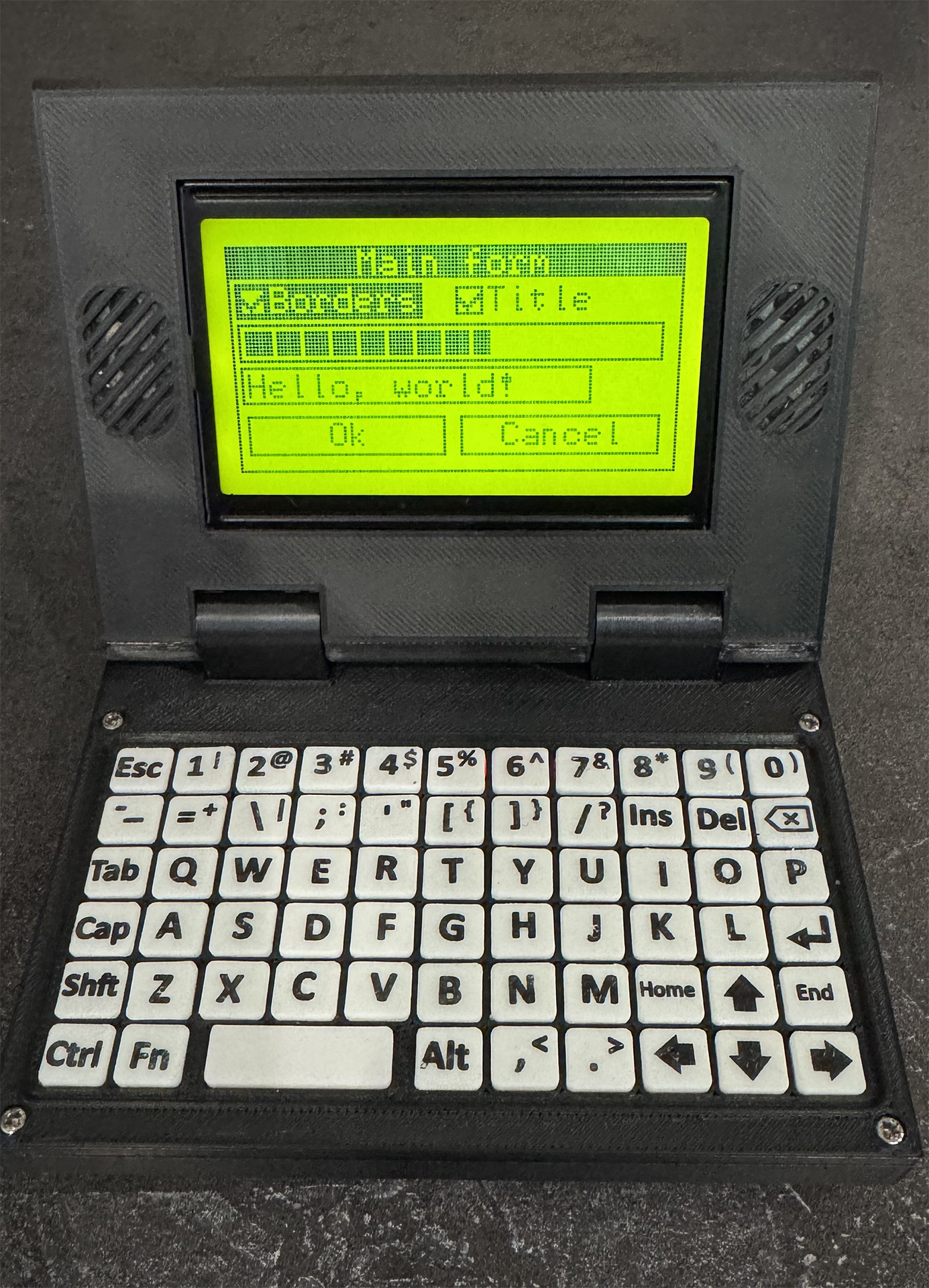
And to wrap up — a small code example to show what working with the UI engine looks like.
void setup() override
{
    form = new Form();
    form->setCaption(F("Main form"));
    form->setDrawBorder(true);

    chkBorders = form->addCheckBox(1, 1, true, "Borders");
    chkTitle = form->addCheckBox(62, 1, true, "Title");
    progressBar = form->addProgressBar(1, 12, 120, 10, 0, 100);
    textBox = form->addTextBox(1, 24, 100, 10, "Hello, world!", 16);
    btnOk = form->addButton(2, 38, 57, 11, "Ok");
    btnCancel = form->addButton(64, 38, 57, 11, "Cancel");

    chkBorders->setEventMask(EVENT_CLICK | EVENT_VALUE_CHANGED);
    chkTitle->setEventMask(EVENT_CLICK);
    progressBar->setValue(60);
    btnOk->setEventMask(EVENT_CLICK);
    btnCancel->setEventMask(EVENT_CLICK);

    ui.showForm(form);
}

void loop() override
{
    if (keyboard.take(keyEsc))
        requestClose();

    taskYIELD();
}

void onEvent(UIElement *sender, uint8_t event, uint8_t value) override
{
    (void)value;
    if (sender == chkBorders && (event == EVENT_CLICK || event == EVENT_VALUE_CHANGED))
    {
        form->setDrawBorder(chkBorders->isChecked());
        return;
    }

    if (sender == chkTitle && (event == EVENT_CLICK || event == EVENT_VALUE_CHANGED))
    {
        form->setShowCaption(chkTitle->isChecked());
        return;
    }

    if (event == EVENT_CLICK)
    {
        if (sender == btnOk)
        {
            //
        }
        else if (sender == btnCancel)
        {
            requestClose();
        }
    }
}
And here's what this task looks like on the device:
Discussions
Become a Hackaday.io Member
Create an account to leave a comment. Already have an account? Log In.