Find the right ESP32 touchscreen display for your project by filtering boards, screen size, resolution, interface, touch technology, PSRAM
To make the experience fit your profile, pick a username and tell us what interests you.
We found and based on your interests.

There are more ESP32 touchscreen displays available than ever before.
That is great for makers and embedded developers, but it also makes choosing the right hardware increasingly difficult.
Different boards can use different ESP32 variants, display interfaces, resolutions, touch controllers and memory configurations. Some are better suited for LVGL, while others are better for simpler projects.
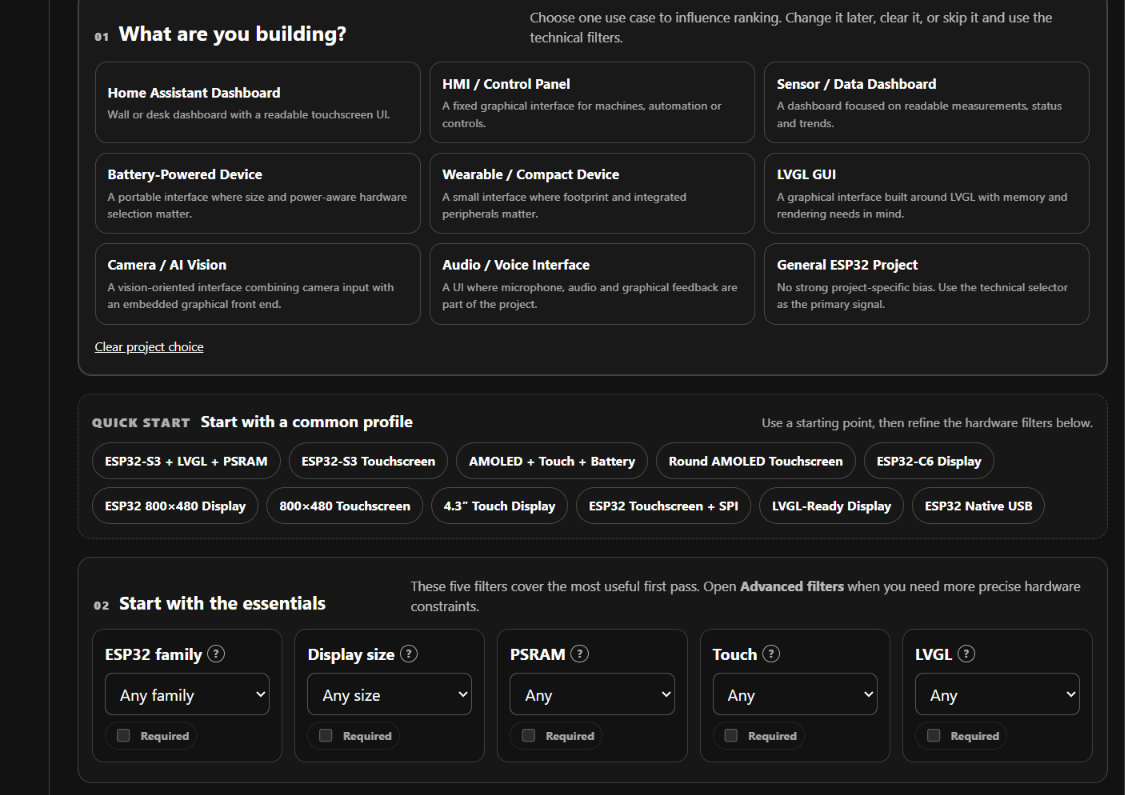
I built the ESP32 Touchscreen Selector to make this comparison easier.
The idea is simple:
Describe what your project needs → filter the available displays → find suitable hardware.
The selector currently focuses on practical specifications such as:
The project is open source and will evolve as new ESP32 touchscreen hardware becomes available.
https://webzf.github.io/esp32-touchscreen-selector/
https://github.com/webzf/esp32-touchscreen-selector
I'm particularly interested in feedback from people actually building ESP32 touchscreen projects.
If there is a board or display that should be included, or a specification that would make the selector more useful, let me know.
Create an account to leave a comment. Already have an account? Log In.
Thanks, Kritish, that's a great suggestion, and you're right that the display driver and touch setup is where most people get stuck. I'm adding a known-good TFT_eSPI / LovyanGFX config link per board, along with the touch controller and its pins. If there's a board where you've already had a config working, I'd happily link to it.
Become a member to follow this project and never miss any updates
About Us Contact Hackaday.io Give Feedback Terms of Use Privacy Policy Hackaday API Do not sell or share my personal information
Useful. The filter I'd want most is a link to a known-good TFT_eSPI or LovyanGFX config for each board, plus the touch controller and its pins. Picking the board is easy. Getting the display driver and touch working is where people lose an evening.