Close
0%
0%

Bringing Text to Life on an ESP32

Text on a small display should come alive. It started with clock digits made of Bézier curves; this is where the idea went.

Similar projects worth following
A clock tells you the time, and you get it at a glance: you look, you know. Good design makes it easier to spot; animation makes it feel alive. Do you need the animation? No. It's a finishing touch, the kind an artist adds: everything works without it, and with it the thing is a pleasure to look at. This project is about pulling off that kind of touch on a microcontroller. It started in 2021 with a clock whose digits were Bézier curves, went on through a font editor, a dot-matrix clock, the Game of Life, and morphing between glyphs, and five years later came back to where it began. I do it simply because I like bringing information to life, and because I like programming as a kind of art. Microcontrollers come with their own limits, and getting around them is the challenge. A warning: it's a long story, and I tell it one step at a time.

"NICE TOUCH, DUDE"

After the Bézier curve clock that I built in 2021 https://habr.com/ru/articles/818873/ (in Russian), I got the idea of doing an entire handwritten font the same way. The existing formats, TTF and OpenType, don't work for this, and not because they're hard to parse. They store the outline of a letter, the boundary of a fill, while a handwritten font needs the path of the pen: the order of the strokes, their direction, where the pen leaves the paper, and how a letter joins its neighbor. None of that is in an outline, and you can't recover it from one. So I needed a format of my own: simple, but more general than the one in that clock, where any digit fit into three curves and, in theory, into two if you were willing to give up on looks. I had to start with a font editor, hw-fonts https://github.com/jef-sure/hw-fonts which I threw together in Vue with no build system at all: open index.html on your own machine and you can load a font you saved earlier or download the result of your editing. More on it in the log about the font.

The next touch was morphing fonts described by the coordinates of their dots: the dot-matrix clock https://habr.com/ru/articles/817927/ (in Russian).

Then came an intermediate step: live morphing in the Game of Life https://habr.com/ru/articles/1081830/ (in Russian).

That step led to the next one, morphing between the glyphs of a font https://github.com/jef-sure/cyd-dotview-morphing — although the font was really just a source there, and what it actually does is morph between any two matrices. The work moved from one idea to the next and left a handful of possible strategies along the way. Out of that grew a separate framework for morphing between matrices in dgx https://github.com/jef-sure/esp32-component-dgx — more on it in the log about dot morphing.

And all of it for a "nice touch." Simply because I like bringing information to life, and because I like programming as a kind of art. Microcontrollers come with their own limits, and that turns into the challenge: how do you get around them?

A warning: this is a long story. Five years have passed since the idea first came up, the experiments and the search for ideas took a long time, and if I cut the story short it stops holding together.

The story is told in the project logs, one step at a time. The page shows the newest log first; this is the order to read them in:

1. Where it started: a clock of Bézier digits
2. Three problems with curves on a microcontroller
3. A font that stores the path of the pen
4. Joining two letters with one curve

More to come.
  • Bonus: an ESP32-P4 and a 7-inch display

    Anton Petrusevich • 10/25/2026 at 13:11 • 0 comments

    When the article was already finished, the morphing algorithms debugged, and the new versions of the library released, a package arrived from China with a Guition JC1060P470 development board: an ESP32-P4, an ESP32-C6, and a 7" 1024x600 screen. I decided to try it out right away with the clock's current code, and to learn how DSI displays work while I was at it. It turned out they work very simply: all you have to do is set up a buffer in PSRAM, and the display reads from it on its own, as if from a virtual screen. Now isn't that a beauty!

    It turned out there is one "small" detail: byte order. For DSI the pixel sits there little-endian, while for SPI it has to be sent MSB first, that is, starting with the high byte. Well, fine, that's a simple byte swap, and the arithmetic on bytes is very cheap... But the work has to be done in PSRAM, which first has to be read into the cache and then pushed out of the cache, and all of that takes time. And that is where tearing during animation comes in. It turned out the display reads from PSRAM twice as fast as I manage to write there...

    In the end, the fight with tearing and the various ways of fighting byte order ate an entire Sunday, from morning until night. Releasing the article without a library the clock could be built with would have been wrong, and I didn't want to point to an "outdated" version either.

    But now, as a bonus, you can see what my handwritten font looks like when the screen is wide enough for a "clear" hand, when the part of one element already written by the pen doesn't run into the next. The video is at the end of this log.

    The code for this board is the same as for the CYD; only the build target differs: idf.py set-target esp32p4
    For the details on the DSI bus, byte order, and tearing, see the dgx documentation, "A MIPI-DSI display in DGX":
    https://github.com/jef-sure/esp32-component-dgx/blob/main/docs/dsi-display-en.md

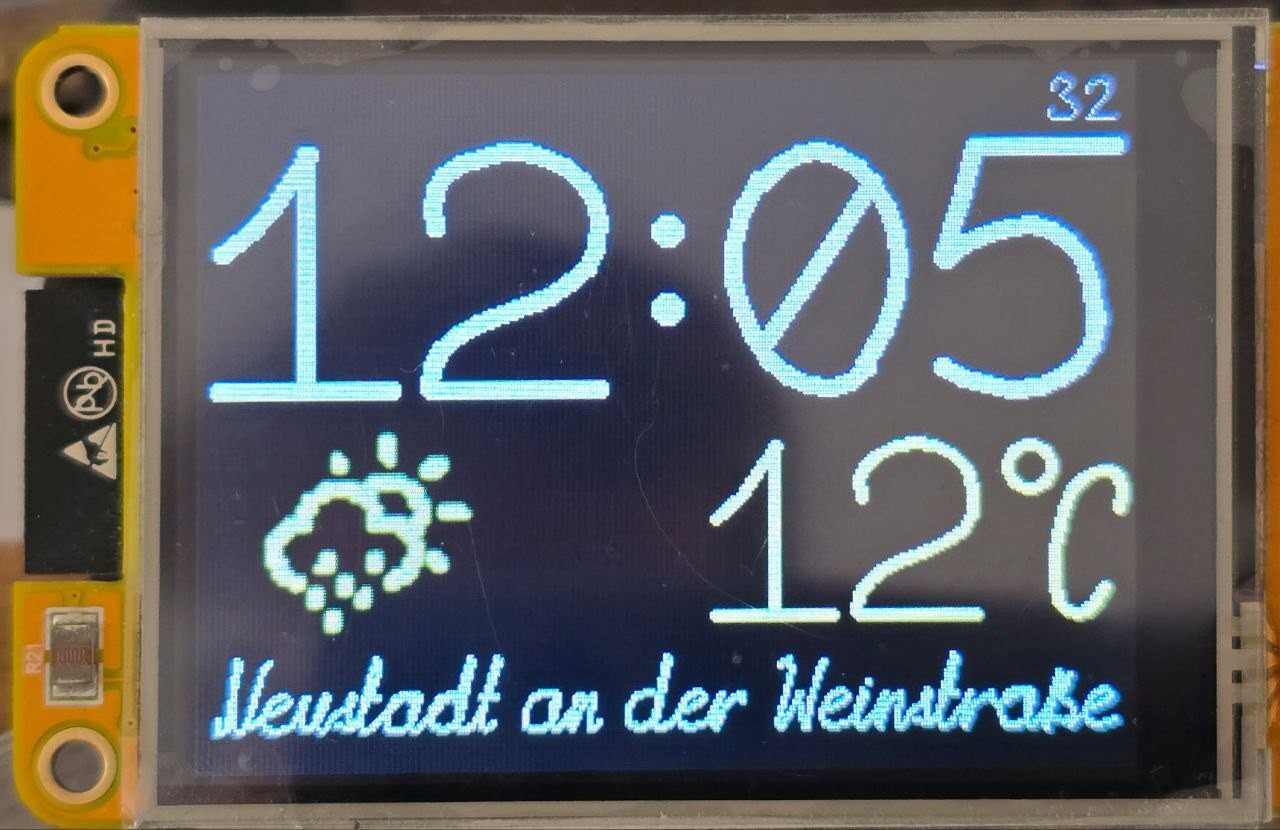
    The clock on a board with an ESP32-P4 and a 1024x600 screen

  • What dgx is

    Anton Petrusevich • 10/24/2026 at 16:09 • 0 comments

    This clock will become a useful thing around the house once it has an enclosure, and that is beyond the scope of this article. For now it is a board on a desk and a rework of the 2021 project. But more than anything it is a demonstration of what dgx can do: everything you notice on the screen is its doing.

    https://github.com/jef-sure/esp32-component-dgx

    dgx is my graphics library for displays on microcontrollers. Today it is packaged as an ESP-IDF component and lives in the component registry. I started writing it long ago and to my own taste: the bus, the screen, and the drawing are separate, there is no hidden shared state, and there can be several identical screens at once. The drawing code doesn't know what it is drawing on: a real display and a virtual screen in memory are the same thing to it.

    What you can see of it here:

    1. The handwritten font: letters as a pen path of Bézier curves, at any size and any thickness, joined up;
    2. Writing at the pace of a pen: the time at power-on, the city name, the temperature, the letters "Z" and "W" in the top row;
    3. Morphing of handwritten symbols: the digits of the time;
    4. Morphing of dot structures with glow: the weather icon;
    5. 8-bit virtual screens with a color table: everything that changes color without being redrawn;
    6. Transferring only the changed part to the display. dgx didn't have this; it appeared in version 0.4.7 while I was working on the clock;
    7. The font2c utility: it turned the handwritten font from the editor into code, and it turns the weather icons from a TTF font into code at every build.

    What you can't see here but dgx has: drivers for the ST7735, ST7789, GC9A01, SSD1351, SSD1306, SSD1309, SH1106, ST7565R, and ST7920 besides the ILI9341, and for the JD9165 and JD9365 on MIPI-DSI; I2C and 8-bit parallel buses besides SPI; monochrome screens, a composite screen made of two displays, ordinary bitmap fonts with UTF-8 text output in eight orientations, textured quadrilaterals, and an arc gauge.

    You can look at some of that without reading the code: the dgx repository has ready-made examples. Almost all of them are built for the same CYD board as the clock and flash to it as is:
    https://github.com/jef-sure/esp32-component-dgx/tree/main/examples
    1. screen_demo is a general check of the display: fills, text, lines, rectangles, circles, and triangles in turn. It is the only example for a plain ESP32 with an ILI9341 on wires;
    2. hw_font_demo is the handwritten font: three lines are fitted to the screen and written by the pen, joined up, in Russian and in English;
    3. hw_morph_demo is morphing of handwritten words: a word turns into the next one, now as a whole, now letter by letter;
    4. morph_demo is morphing of dot words with glow, letter by letter;
    5. glyph_morph_demo turns one large symbol that fills the screen into the next: digits, Latin, Cyrillic;
    6. life_morph_demo is Conway's Game of Life in which a generation doesn't replace the previous one but flows into it;
    7. flip_clock_demo is a flip clock: half of a digit falls like a flap, drawn as a textured quadrilateral;
    8. texture_demo draws a card with lettering into a texture once and then scales it, rotates it, and makes it ripple.

    A bit of demoscene in dgx is in the video at the end of this log.

    The texture_demo example from dgx

  • Building it, trade-offs, credits

    Anton Petrusevich • 10/23/2026 at 11:31 • 0 comments

    Building

    You need ESP-IDF 5.2 or newer: the lower bound is set by dgx, and the clock has no version requirements of its own. The 5.2 comes from the I2C bus: it is written on a driver that earlier versions don't have. The rest of the API I use is compatible with that version, but my local version is higher: I built and tested under 5.5.4 and 6.0.1, on one board, and didn't test real operation under versions 5.2 through 5.4. The component manager will download the components, dgx 0.8.1 among them.

    The weather icons are made from their TTF font during the build, by the font2c utility of dgx, which is built on the spot. So the computer needs a C compiler, pkg-config, and the FreeType development files (libfreetype-dev on Debian and Ubuntu).

    The versions are named as of this log, October 2026: dgx 0.8.1 is the latest, and 5.5.4 and 6.0.1 are the ESP-IDF versions I have on hand.

    idf.py set-target esp32
    idf.py build
    idf.py -p /dev/ttyUSB0 flash monitor


    Wiring the display

    On the CYD board everything is already connected. For another board the pins are set in main/display.c:
    • MOSI: 13
    • MISO: 12
    • CLK: 14
    • CS: 15
    • DC: 2
    • BLK: 21
    • The button is GPIO 0.

    Trade-offs

    1. There is no forecast, only the weather right now. OpenWeatherMap has one, and it's free, 5 days in 3-hour steps, but it is a different request and different parsing, and at the time there was no good way to show it on the clock. That came later, with dgx-di;
    2. Choosing the zone by the nearest place sometimes gets it wrong where a zone without daylight saving time is nearby: El Paso will get the zone of Phoenix. Then the zone has to be chosen on the page;
    3. Letters of other languages with diacritics in a city name are written without them; see the previous log. The font has no Chinese characters and no Arabic script: a name like that will be written in part or not at all;
    4. The settings page is styled with Bootstrap, and the browser loads its CSS file from the internet, from a CDN: the clock doesn't carry it. With no internet on the phone the page works but looks like bare HTML;
    5. The page has no password. It exists only after the button is pressed and only on the local network.

    Third-party resources

    1. The weather icons are the Weather Icons font by Erik Flowers, under the SIL OFL 1.1 license, from https://github.com/erikflowers/weather-icons — the font itself is in misc, and the icons the clock uses are turned into code from it during the build, by font2c from dgx;
    2. JSON is parsed with mjson by Cesanta, under the MIT license, from https://github.com/cesanta/mjson — it first appeared in the dot-matrix clock https://habr.com/ru/articles/817927/ (in Russian): there, on a 16 KB response with a weather forecast, the cJSON that ships with ESP-IDF could ask for more memory than the heap had free. mjson builds no tree from the response and allocates no memory: a value is read by a path like $.main.temp straight from the text. Here the current weather is a 600-byte response, but the library stayed. Back then it hadn't been ported to the ESP32; now it is the component jef-sure/mjson in the registry: https://components.espressif.com/components/jef-sure/mjson/

  • Where am I, what time is it, how's the weather

    Anton Petrusevich • 10/23/2026 at 11:22 • 0 comments

    "WHERE U FROM"

    The location is set in a single text field, and it is read in one of three ways: coordinates ("52.52,13.40"), a city with a country ("Berlin,DE"), or a postal code with a country ("10115,DE"). Coordinates are taken as they are; anything else is looked up once with the OpenWeatherMap geocoder: first as a name and then, if that finds nothing and the text starts with digits, as a postal code. The coordinates and the name it finds are saved and aren't looked up again until the text in the field changes.

    Cities that share a name do exist: Germany has two Frankfurts, one on the Main and one on the Oder, and given just the name the service will pick one of them on its own. A postal code or coordinates are more reliable.

    You can set your own name for the screen. The service names a place its own way: the full name of a city where the short one would do, or the city where the name of the district is what people actually use. An empty field means the name from the service, which is shown in that field in gray as a hint. A location given by coordinates has no name; it is taken from the weather response and saved as well.

    The city name comes from the service as is, and the font has only the Latin alphabet, the German "ä," "ö," "ü," "ß," and the Russian alphabet. A letter of another language, with a stroke, a caron, or a tail, is written without its mark: "Kraków" as "Krakow," "Málaga" as "Malaga," "Łódź" as "Lodz." German names are left alone: "Köln" stays "Köln."

    The substitution goes by a table in main/city_face.c. It was put together by hand and covers two Unicode blocks, Latin-1 Supplement and Latin Extended-A, the characters from U+00C0 to U+017F, 192 in all. Each letter in it is mapped to the same letter without its mark, and letters like "æ," "œ," and "þ" to two: "ae," "oe," "th." That is enough for the European languages written in Latin script. A character that is in neither the font nor the table is skipped.

    Finding the location by IP address through https://ipinfo.io is left over from the 2021 clock, and it needs a key of its own. Back then that was the only way the city was found, and for me it regularly came out as the next town over: an error of tens of kilometers is par for the course with this method. For the weather and the time zone that hardly matters, but it's nicer to read the truth on the screen. So now it is off until someone turns it on. When it is on, it asks for the location again every 10 minutes: a clock set up that way may be on the move.

    Time

    The time comes from pool.ntp.org as soon as the clock has an address on the network. Until then the clock runs from the build time of the firmware, and what's on the screen isn't true.

    The time zone is either chosen from a list or found automatically. The list is made at build time from the tz database of the machine doing the build: for every zone the script misc/generate_tzones.py takes the POSIX rule string from the zone's file, for example CET-1CEST,M3.5.0,M10.5.0/3 for Berlin, and the country and the coordinates of the zone's main city from the zone.tab table. In October 2026 that came to 598 zones. The database itself isn't on the microcontroller, only this table, and the library works out daylight saving time from the rule string.

    When no zone has been chosen, it has to be worked out. The weather response has no zone name: only the country of the place and its offset from UTC in seconds at that moment, 7200 for example. The offset alone isn't enough: it doesn't tell you whether the clocks change here, or when. So of that country's zones, the ones with the same offset right now are taken; of those, the one nearest to the place by coordinates; and if several zones have the same rules, the country's main zone. The zone that was found is saved, and from then on the clock lives by its rules, daylight saving time included. Until the weather arrives, the clock shows UTC. If no suitable...

    Read more »

  • An HTML page cut up at build time

    Anton Petrusevich • 10/22/2026 at 20:40 • 0 comments

    A web page on a microcontroller is usually either entirely static or assembled in code from scraps of HTML in printf calls, and then you can neither open it in a browser nor hand it to a web designer. Here the page is an ordinary HTML file, misc/index.html. You can open it from disk and see what it looks like, and edit it in any editor; the field values in it are marked by placeholders such as %HOST_NAME% and %TIMEZONE_OPTIONS%.

    I came up with this back for the dot-matrix clock https://habr.com/ru/articles/817927/ (in Russian), along with the QR code for setup. There a Perl script cut up the HTML. I had to move to Python because ESP-IDF drags it along in any case, while a person may well not have Perl.

    The idea itself I picked up from the "real" template engines in big systems: they, too, first parse a template into constant pieces and calls to code, and then run the finished list. Here the parsing has been moved to build time, and only the running is left for the microcontroller. I haven't seen this approach in other people's microcontroller projects.

    At build time the script misc/split_to_template.py minifies the file, removing comments and the whitespace between tags, and cuts it into pieces at those placeholders. The pieces become a header file with an array of pairs, "constant text, handler": the constant text is the piece of HTML up to the next placeholder, and the handler is a function that outputs the value for that placeholder. The function's name is made from the placeholder's name: %HOST_NAME% becomes http_data_host_name. The clock's page has eight placeholders and nine pieces, 4 KB of HTML after minifying.

    The array is included in main/webserver.c, where those functions are written. The compiler checks that they match: a placeholder added to the HTML without a function, or a function without a placeholder, is a build error, not an empty field on the page that somebody notices six months later.

    A request for the page is handled by walking the array: send a constant piece, call the handler, on to the next piece. Everything is sent in parts, chunked, straight from flash: the page is never assembled in memory, there is no buffer for it, and there is no template engine. A handler sends its value with &, <, >, and quotes replaced by HTML entities, so that a key or a name containing one of those characters doesn't break the page. The only handler with a buffer is the list of time zones: that is about 600 option lines, tens of kilobytes, and they are collected a kilobyte at a time and sent in batches rather than one by one.

    The form comes back as a form-encoded POST, no more than 2 KB, and is parsed in place in the string received: %XX and + are decoded right where they were read, and no memory is needed for a copy. The fields go into the settings structure, and the whole structure is compared with the current one: if nothing changed, nothing is written to NVS and the page answers "no changes." After parsing, the browser is redirected to a result page, so refreshing the page in the browser doesn't submit the form again.

    The settings are stored in NVS as one record: the structure and its version number. When a field is added, the number goes up, a record of the previous version is read as the beginning of the new one, and the new fields get their defaults. That lets the firmware be updated without losing the settings. A record with an unknown version isn't read at all, and the clock starts from a clean slate.

    On a board with a DSI display there is one more record in NVS, and this one isn't a setting: the measurements of the board. On first start dgx measures from what size on a piece of a picture is better handed to the hardware transfer than to the processor, and the clock saves the result so it doesn't have to measure on every power-on. The measurement takes 0.07 s and doesn't show on the screen. "Clear all settings" leaves this record alone: it describes the board, not the owner.

  • Setting it up without a computer

    Anton Petrusevich • 10/22/2026 at 20:37 • 0 comments

    In the 2021 clock the Wi-Fi password and the service keys lived in sdkconfig, that is, in the firmware. Now the project configuration holds only the hardware, and everything that has to do with location, network, and services the clock keeps in its own NVS, where it survives reflashing. It is set in two ways: the Wi-Fi network from a phone over BLE, with the standard Espressif app that is in Google Play and the App Store, and the rest on a web page that the clock serves itself. Neither needs a computer.

    Network

    In the dot-matrix clock the network was set through SoftAP: the clock brought up its own access point. I dropped that: on the phone you have to connect by hand to a new, unfamiliar access point. With BLE the phone stays on its own network, and the app does everything else. Not the most convenient app, I have to say. The provisioning protocol allows for arbitrary extra data of your own, but the app can't handle it. If you need to set up several devices at once, you'll be typing the same data into the app every time. Its advantage is that the app already exists for both platforms: you don't have to become an app developer yourself, write your own app for both platforms, and so on. Too much hassle.

    The app is called ESP BLE Provisioning. A clock that doesn't know a network shows a QR code for it. The QR code carries the device name, "CLOCK-" plus the last three bytes of the MAC address, and a proof-of-possession password: the network can be set by the phone that read the code off the screen, not by anyone who happened to hear the clock over BLE. The app sends the network name and password, the clock tries to connect and answers the phone: connected, wrong password, or no such network. After a failure you can send another network.

    When the clock already has a network and it needs to be changed, the old one is set aside while the setup runs: if no phone shows up within 3 minutes, the clock goes back to the old network and back to work. A clock with no network waits for a phone as long as it takes.

    BLE is needed only for that time. Network setup is a boot of its own: once it has a network, the clock restarts, and in normal operation the BLE stack is unloaded and its controller's memory is returned to the heap. As a side benefit, the radio doesn't have to be shared between Wi-Fi and BLE, and Wi-Fi runs without sleep mode: with it, the clock answered a request for the page with a delay.

    Before setup, the name on the network is "weather-clock-" plus those same three bytes of the MAC address, so that two units in one house don't fight over the name. Under the same name with ".local" added the clock answers on the local network. The name can be changed on the page; letters, digits, and hyphens are kept, and anything else becomes a hyphen.

    Of several access points with the same network name the clock picks the strongest one, not the first one it hears, and after a drop it reconnects in 2 seconds.

    The settings page

    The BOOT button restarts the clock into settings mode. How long you press means nothing, and there is no long press: in an enclosure the button may be a touch button, and when a clock is being carried it's held however it's held, and a finger may rest on the button for as long as you like.

    Settings mode is a boot of its own. The press writes a request to NVS and restarts the clock; the next boot picks up the request, erases it, and brings up the page instead of the clock, and the boot after that is the clock again. That way the page has the screen and the memory all to itself: the web server doesn't have to share RAM with the virtual screens and the tasks of the clock.

    Once it's up, the clock connects to the network and shows the address of the page as text and as a QR code, with the signal level next to it: a page that loads poorly is explained by a weak signal. The page waits 5 minutes, and then the clock goes back to work. Pressing the button again closes it too. If the clock couldn't connect to the...

    Read more »

  • 53 KB for a handshake: memory on an ESP32

    Anton Petrusevich • 10/21/2026 at 19:07 • 0 comments

    The clock doesn't have much RAM, and here is where it goes. Virtual screens: the hours-and-minutes band 32 KB, the temperature band 16 KB, the city name band 15 KB, and the seconds line and the wait indicators together under 2 KB. The glow of the weather icon: two brightness maps at a byte a pixel, 80x74 pixels, 12 KB. Task stacks: five at 4 KB, 8 KB for the weather task, 2 KB for the button, 30 KB in all. Wi-Fi and the system take the rest.

    The hungriest consumer isn't on that list, because it lives for one second: the TLS handshake of a weather request. The service sends a chain of four certificates with keys up to 4096 bits, and verifying it, together with the TLS buffers, takes about 53 KB under ESP-IDF 5.5 and about 48 KB under 6.0. That memory has to be there every 5 minutes, or the weather won't arrive.

    Free before a weather request: 71 KB under ESP-IDF 5.5.4, 73 KB under ESP-IDF 6.0.1.
    Left at the worst moment of the handshake: 19 KB under ESP-IDF 5.5.4, 26 KB under ESP-IDF 6.0.1.

    That was measured right after power-on, while the wait indicators are still on the screen. Once they have what they were waiting for, they go away along with their task and give back another 7.5 KB: the band, the task's stack, and whatever it was using.

    Those indicators made for a story while this text was being written. Under ESP-IDF 5.5 the weather suddenly stopped arriving: the handshake was one kilobyte short for verifying a certificate. The memory had been taken by the wait indicators I had added the day before. They live until the first weather arrives, and the weather couldn't arrive while they were holding the memory. First I turned off the blur of the weather icon: its copy of the frame cost 6 KB. Then, in dgx 0.4.9, the glow went from four bytes a pixel to two, the one-pass blur learned to do without the copy, and it came back. Free memory before a weather request went from 52 KB to 71.

    The same thrift is behind two decisions described in the log about setup: the BLE stack is unloaded as soon as the network is set, and the settings page lives in a boot of its own and doesn't share memory with the clock's screens.

  • The first thing built on it: a weather clock

    Anton Petrusevich • 10/21/2026 at 19:05 • 0 comments

    A weather clock in a handwritten font

    A clock on an ESP32 with a 320x240 display. The time, the temperature, and the city name are drawn in a handwritten font built from Bézier curves: the digits of the time flow into one another, and the temperature and the city are written out stroke by stroke. The weather icon is made of dots and flows smoothly from one icon into the next.

    What the pen writes

    The pen writes:
    1. The time at power-on, digit by digit, in about a second. After that the digits only flow into one another;
    2. The city name, letter by letter;
    3. The temperature. It changes rarely, so it doesn't need morphing. The pen first erases the characters that changed, along the same path it wrote them and twice as fast, and then writes the new ones. The degree sign sits at the right edge, and the digits and the minus sign before it stay in fixed places;
    4. The letters "Z" and "W" in the top row, while the clock is waiting for the time and the weather after power-on: the pen writes the letter, erases it, and writes it again.

    There is no real erasing here; it's a trick: to remove what was written, the pen writes the same thing once more, along the same path and at the same thickness, only in ink the color of the paper.

    The font has no "℃" sign. It is assembled on the spot: a ring in the upper left corner and a narrow letter "C" from the font, together the size of one digit.

    The minus before a number is not a hyphen. The hyphen in the font sits at the middle of the lowercase letters, which is where it belongs in a name like "Rostov-on-Don." In front of digits it ends up too low and looks like an underscore that has crept upward. So font0ss has a separate minus sign: a bar at half the height of the digits, 31 units above the hyphen. The font doesn't swap one for the other on its own; the minus is put there by the code that writes the number: the temperature gets the minus sign (−), and the city name keeps its hyphen (-).

    Power-on is in the video at the end of this log: the pen writes the time and the city name, and the indicators in the top row show what the clock is still waiting for. Wi-Fi connects first, then the weather arrives, and the time from the network comes last.

    Scale in the clock

    The temperature is drawn with one scale for both axes. So is the city name, as long as it fits its place across; a long name is not shrunk but squeezed horizontally, the letters keep their height, and the pen slims down along with it. A short name is not stretched to the full width. The digits of the time always have two scales, across and down, and they are computed from the room on the screen. The hours-and-minutes line is divided into slots, one per digit. The widest digit of the font has to fit a slot across and the tallest has to fit the line down; that gives two numbers, how many pixels a cell takes across and how many down. The proportions of the font are not preserved.

    Only the control points are stretched: x is multiplied by one scale and y by the other, while the pen stays round and the same thickness in every direction. So a stretched digit has vertical and horizontal lines of the same weight, unlike lettering stretched in an image editor, where the horizontal strokes get fat.

    The clock picks the pen thickness itself, and it is the clock, not the font, that ties it to the scale: the pen is 9 font cells times the scale, so the line grows and shrinks with the letter. At a scale of 0.5 that is 4–5 pixels, and at a scale of 2 it is 18. With two scales the geometric mean is used: on a 320x240 screen that comes to 6 pixels for the hours and minutes and 1 pixel for the seconds.

    The digits differ in width; a one is narrower than a zero. The slot is the same for all of them, and a digit is shifted to the middle of it, so the time doesn't slide around the screen when a one replaces a zero.

    That kind of stretching doesn't work for handwritten letters: with different scales on the two axes the slant and the curves would drift,...

    Read more »

  • One task owns the display

    Anton Petrusevich • 10/20/2026 at 21:28 • 0 comments

    Exactly one task works with the display. I hold to the principle that one party alone should work with a physical bus: no locks are needed, and what to do is passed along in messages. I try to build things this way every time, and it is also why none of the components I publish in the Espressif registry https://components.espressif.com/components?q=namespace:jef-sure are thread-safe: one task owns the device, and there is nobody to protect it from. The time, the weather, the city, and the wait indicators each draw on virtual screens of their own and send that task a message: what to show and where. Once it has sent the message, a task waits for nothing and goes on with its own business.

    There is no lock on a virtual screen either: at any moment it has one owner. While a task is drawing, the screen is its own. A "show this" message hands the screen to the display task, which transfers it to the display and hands it back. A task waits only when it needs its screen again and the screen hasn't come back yet: right before drawing on it. Until that moment it is free, and that time goes to the other tasks.

    The "screen is back" signal is a FreeRTOS binary semaphore, one per screen, but it doesn't work as a lock. A task takes it before drawing and, when it sends the message, doesn't give it back: the screen goes along with the message. The display task never takes it and never waits on it; it only gives it after the transfer.

    There used to be a mutex here. Both sides took it, the owner of the screen and the display task, which waited on it. It wasn't protecting any shared data; it was standing in for that same handing of the screen from one to the other. Now the handoff is explicit, and the display task waits for nothing.

    That is also where the pace comes from. Over SPI you can't draw more often than the screen gets to the display: the transfer takes time, and that time is always enough. For a display on DSI the transfer costs almost nothing, so there the source keeps the pace itself, the way a video player does: it doesn't start the next picture until one frame of the display has passed since the previous one.

    For the details on curves, thick lines, and the font, see the dgx documentation, Handwritten text in DGX:

    https://github.com/jef-sure/esp32-component-dgx/blob/main/docs/handwriting-en.md

  • Drawing: segments, thick lines, ink

    Anton Petrusevich • 10/19/2026 at 20:42 • 0 comments

    How it was

    In 2021 I tried to come up with an algorithm for choosing the number of segments automatically, but in the end I settled for a fixed one: 13 for any curve. For a small curve that is too many, for a large one too few. I did the thickness by brute force: thick segments, with filled circles at the joints to close the wedges. I'm sorry to say I was never happy with the joints, and when I timed it, the circles alone turned out to take a third to a half of the time to draw a symbol. Anti-aliasing mostly hid the flaws of the joints, and for its sake the digits were drawn on 8-bit virtual screens, where a byte is an amount of ink.

    Every digit had its own virtual screen, 40x120, and the ones that had changed were sent to the display. Two tasks drew on them, time and weather, and a third, the main one, transferred them to the display: it was sent a message that a frame was ready. While the message was on its way, the drawing task could already have started the next frame, and the main task would have transferred a half-erased screen. To keep that from happening, a semaphore guarded the virtual screens: whoever draws or transfers holds it.

    How it is now

    The editor counts the segments: for every curve it stores the smallest number at which the polyline strays from the curve by no more than half a unit. On output that number is multiplied by the square root of the scale. The right half of the zero in font0ss needs 13 segments at a scale of 1, 10 at half scale, and 19 at double. Funny thing: at a scale of 1 it comes to the very 13 I picked by eye in 2021. Or maybe my eye is just trained by now.

    The square root is there because the deviation of a polyline from a curve falls as the square of the number of segments: a curve twice as large needs 1.41 times as many, not twice as many. Saving on segments is worth it: the drawing time depends on how many there are, not on the length of the line.

    A segment is now a single convex shape: a rectangle with a flat start and, at the end, a disc as wide as the line. The start is covered by the disc of the previous segment, so there are no gaps at the bends whatever the turn. The font draws in about 60% of the time it used to take.

    The gain is in calls, not pixels. A shape is filled row by row: for every row of the screen there is one call that paints a horizontal strip from the left edge of the shape to the right. A call costs 1.3–1.9 µs almost regardless of how many pixels are in the strip. Before, a segment and the circle at its joint were filled separately, and where they overlapped the same screen row was painted twice. Now there is one shape and it is convex: in any screen row it has exactly one strip, and so one call.

    The curves are no longer anti-aliased: the joints it used to hide are gone by construction. The edge of a line became soft again later, in another way: dgx got a pen with a soft edge, and the clock writes with it now. That is a log of its own, at the end. Post-processing is still available, but only for dot morphing. There, each frame can be run through a filter before output, and dgx comes with a ready-made blur filter: a one-bit icon looks jagged without blur. The weather icon uses it, one pass. What that filter once cost is told in the log about memory.

    The 8-bit virtual screens stayed, even though the anti-aliasing they were there for is gone; the soft pen writes only on them. A byte is an amount of ink: 0 is paper, 255 is ink. A screen like that has no color; the color appears when it is transferred to the display: a table of 256 values says what color to show each amount of ink in, from the color of the paper to the color of the ink. To recolor the time, at sunset for instance, it's enough to recompute the table; the drawing itself stays as it is. And eight bits instead of sixteen cut the memory in half: the hours-and-minutes band, 320x100, takes 32 KB instead of 64, the temperature band, 220x74, takes 16 KB, and the city name band, 320x46, another 15 KB....

    Read more »

View all 18 project logs

Enjoy this project?

Share

Discussions

Similar Projects

Does this project spark your interest?

Become a member to follow this project and never miss any updates