Close
0%
0%

AirWriter

Print to vintage Apple printers from modern devices over AirPrint, or from a vintage Mac over AppleTalk.

Similar projects worth following
AirWriter is a little device that plugs into a vintage printer's serial port or LocalTalk port. iPhones and MacBooks see it as a regular AirPrint printer, and vintage Macs see an AppleTalk printer in the Chooser over a LocalTalk cable or over Wi-Fi through BlueSCSI. Basilisk II and Infinite Mac can print to it as well. It prints in color and b&w.

What the heck?

The ImageWriter II is a great printer, but it has no network port. Printing to one usually means keeping an old Mac around, or a modern computer with an old Ghostscript driver. I wanted to print to mine straight from my phone, so I made a dongle that does all the work itself.

It's an ESP32-S3 on a custom board with two mini-DIN ports, one for the printer and one for LocalTalk. When you hit Print, AirWriter takes the job over Wi-Fi, dithers it with Atkinson dithering (the same one the original Mac used), converts it to the ImageWriter's graphics mode and sends it down the serial cable. It uses the same Apple cable that connects the printer to a Mac, so you probably already have one.

If the printer runs out of paper or someone presses SELECT, your phone gets an alert, and the page carries on once you fix it.
The PCB design

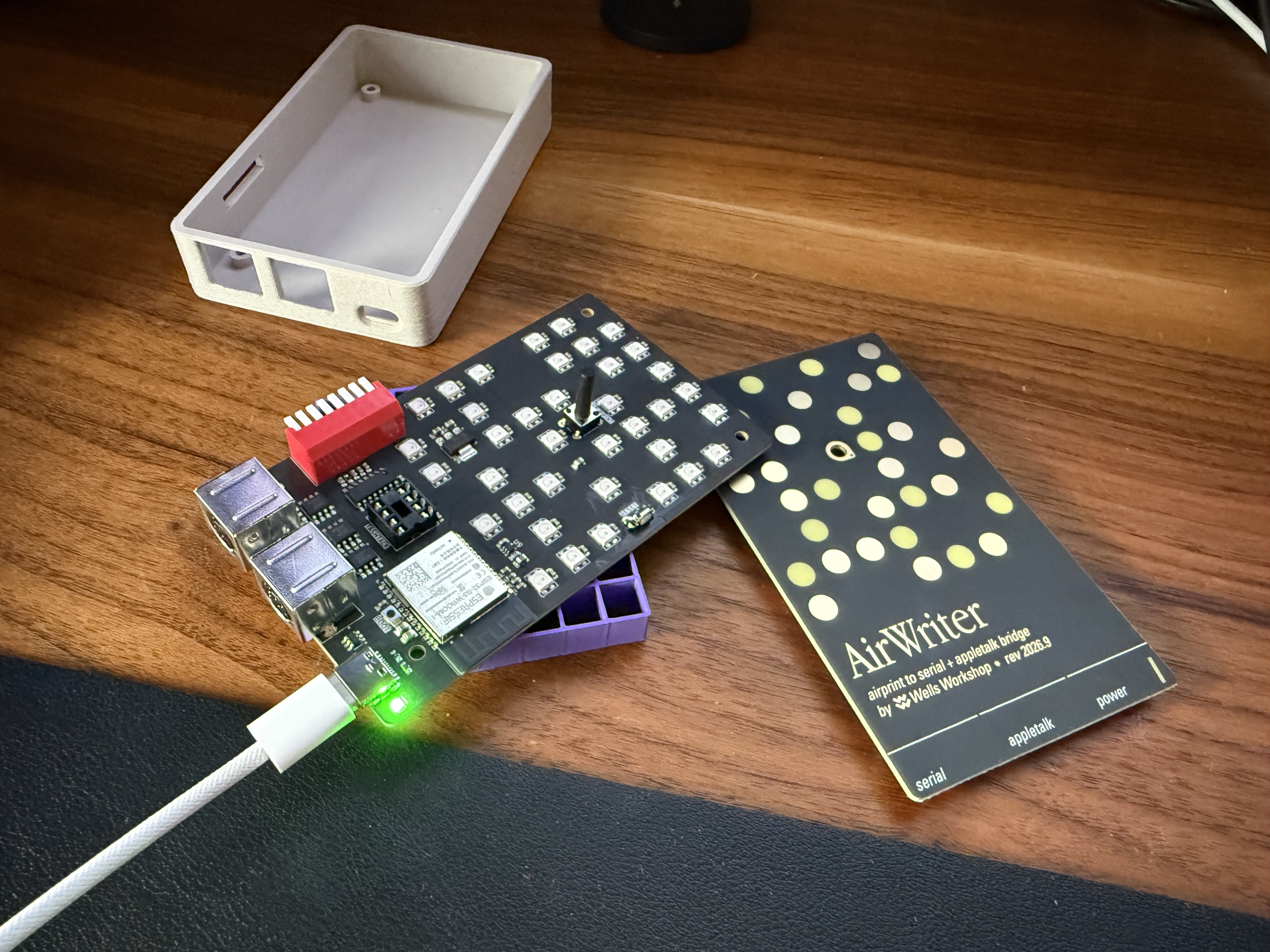
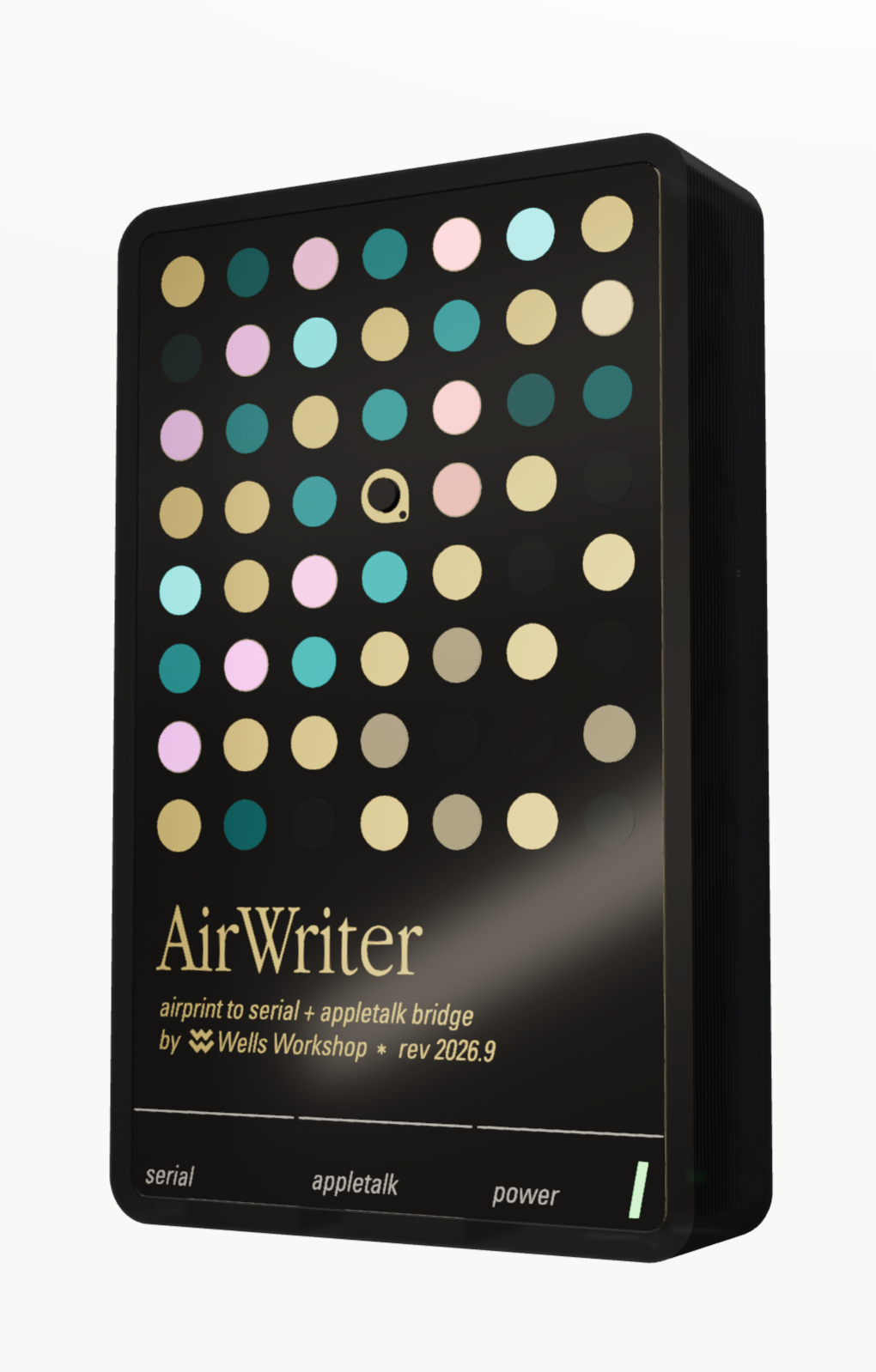
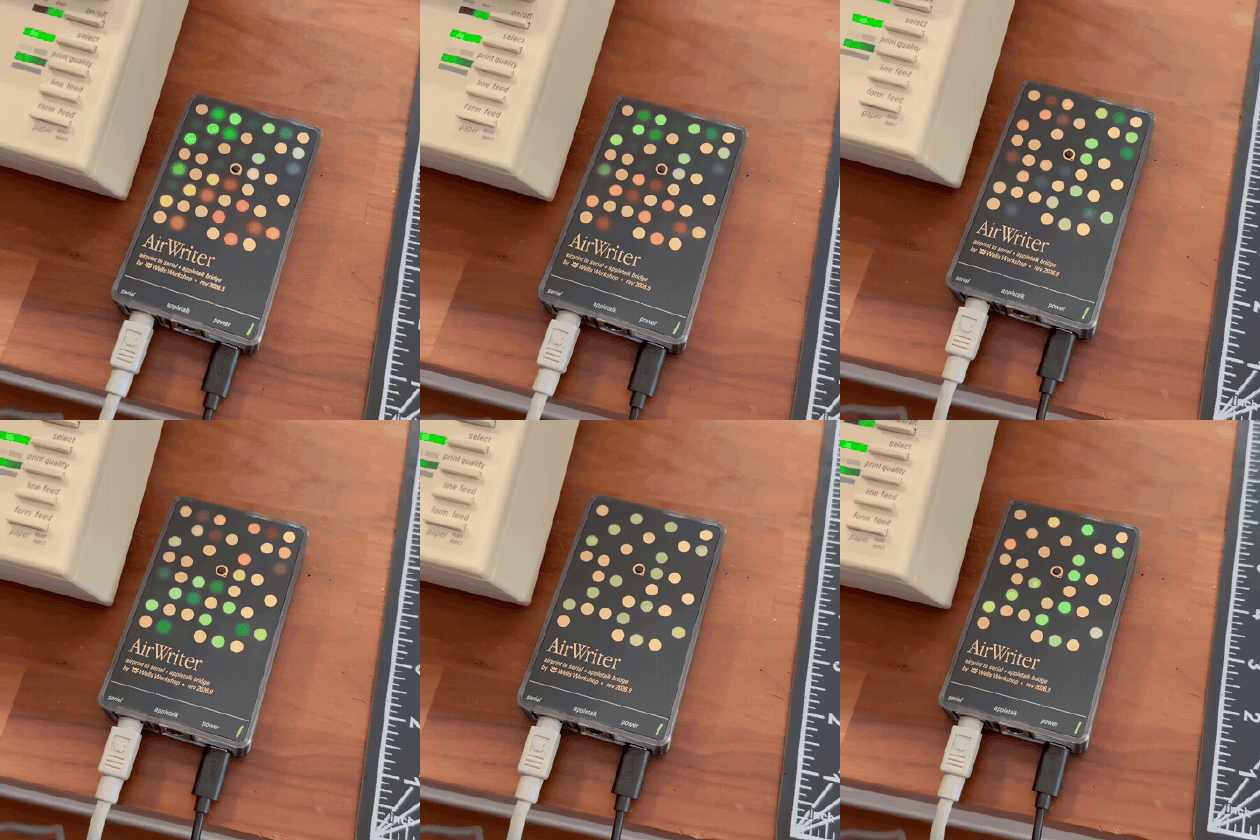
The top case is a second PCB with no parts on it, just artwork. Its grid of dots is made from bare FR4, soldermask and gold, and 37 RGB LEDs behind it show what the printer is up to. A little print head runs across the dots while it prints, they turn amber when it needs paper, and they glow like embers when the printer is switched off.

I ordered the PCBs from PCBway, using the "ENIG Gold" process with black matte solder mask. The ENIG process uses a thin layer of real gold on the bare copper contacts that won't tarnish, and the board finish is overall much smoother than you can get from HASL.

Overall I'm really happy with the quality. It was a bit of a risk because I've never done ENIG before, and it's more expensive. Because the PCB is part of the product design itself, the fit-and-finish needs to be pretty high.

Delivery took longer than usual, but I'm really happy with how the boards look and PCBway's customer service was helpful throughout the process. In my next batch I'm going to try transparent PCBs since the yellowish FR4 seems to block almost all of the blue and violet light shining through from the RGB LEDs below.

Project status

It all works end to end now. My iPhone and MacBook print over AirPrint, and my SE/30 prints with the regular ImageWriter driver in System 7.5.3, over a LocalTalk cable or over Wi-Fi through its BlueSCSI. As far as the Mac knows, it's talking to Apple's LocalTalk card! Basilisk II and Infinite Mac can print to it too, and with Apple's color ribbon in it prints in color. Home Assistant's printer integration even picks it up.

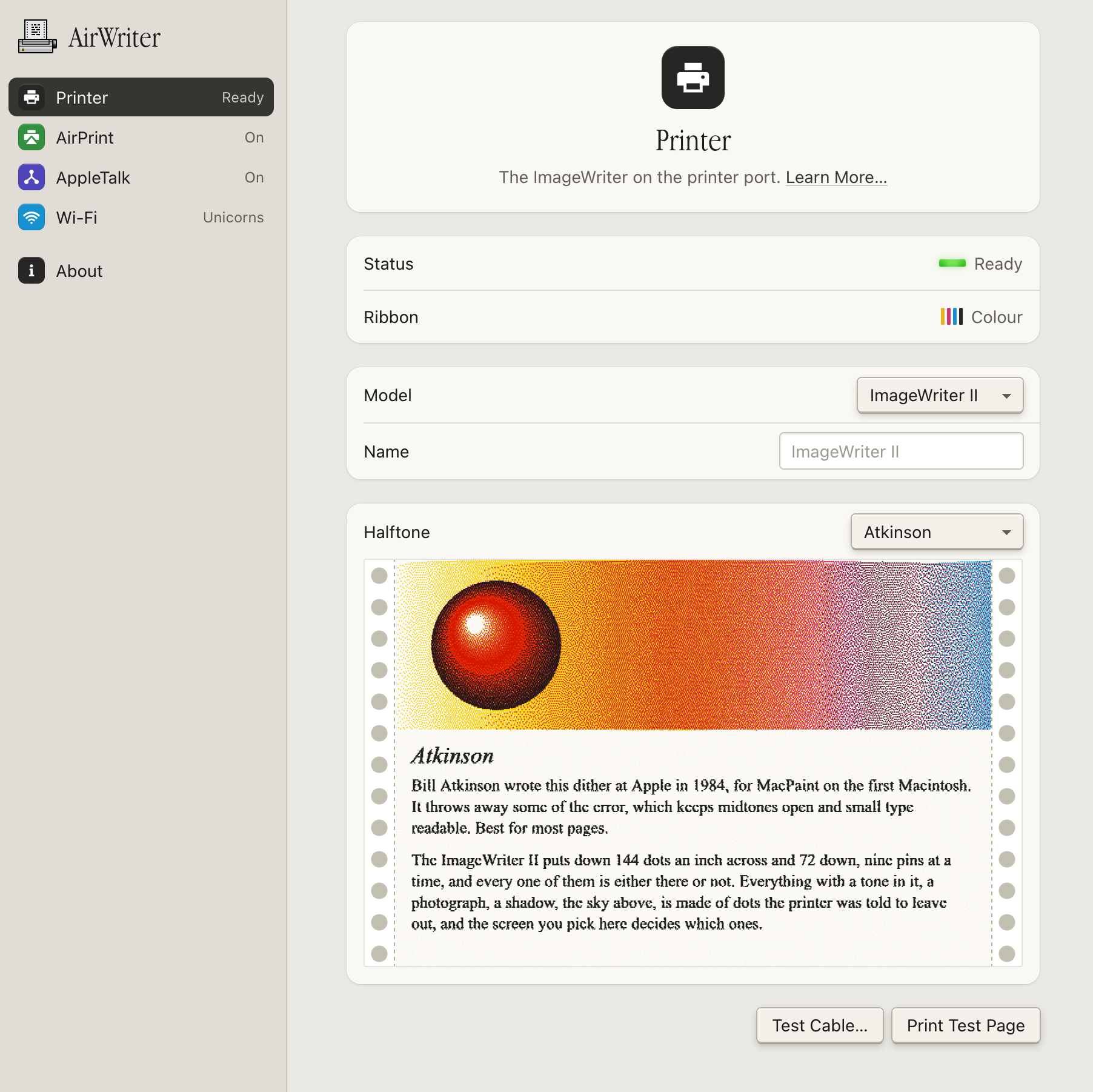
Settings live on a little web page that looks like a Platinum settings app, and firmware updates come straight from GitHub releases.

I've only tested it on my ImageWriter II. The original ImageWriter and the ImageWriter LQ take the same commands, so they should work, and I'd love to hear from anyone who can try one. I'm working on LaserWriter support next.

The LocalTalk side runs on TashTalk by lampmerchant (Tashtari), and its wiring comes straight from FeralFirmware's TashTalkUSB. polpo's ImageScribbler is what I leaned on for the AppleTalk part, and Infinite Mac is Mihai Parparita's. Thank you all!
AirWriter will be available at shop.wells.ee. Hardware and firmware are both open source.

  • 1 × ESP32-S3-WROOM-1-N8R2 Wi-Fi, 8 MB flash, 2 MB PSRAM
  • 1 × PIC12F1840 Microprocessors, Microcontrollers, DSPs / ARM, RISC-Based Microcontrollers
  • 1 × SP3490 Interface and IO ICs / RS-232, RS-422, RS-423 and RS-485
  • 1 × SP3232 Interface and IO ICs / Multiprotocol Transceivers
  • 2 × SP3485 Interface and IO ICs / RS-232, RS-422, RS-423 and RS-485

View all 9 components

  • Settings pages and a test page

    Wells Workshop • 10/22/2026 at 17:57 • 0 comments

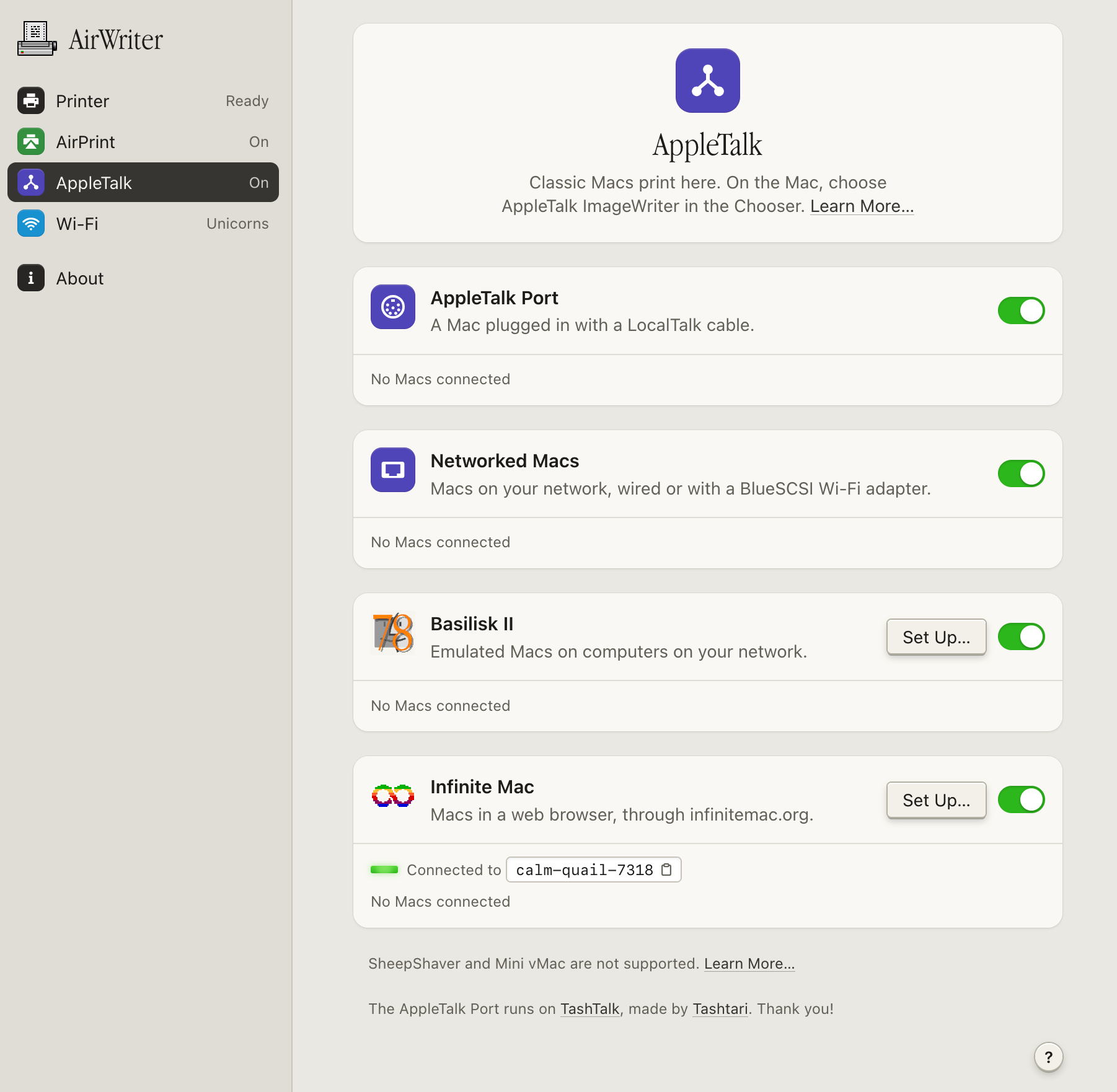
    I'm a product designer by trade, so the settings UI got a lot of attention. It looks like a little Platinum-era settings app, with a sidebar for the printer, AirPrint, AppleTalk, Wi-Fi and About. The AppleTalk pane lists the Macs it has heard lately by the names you gave them in Sharing Setup (mine shows up as "SE30"). If the PIC doesn't have TashTalk on it yet, there's a button to flash it right there.

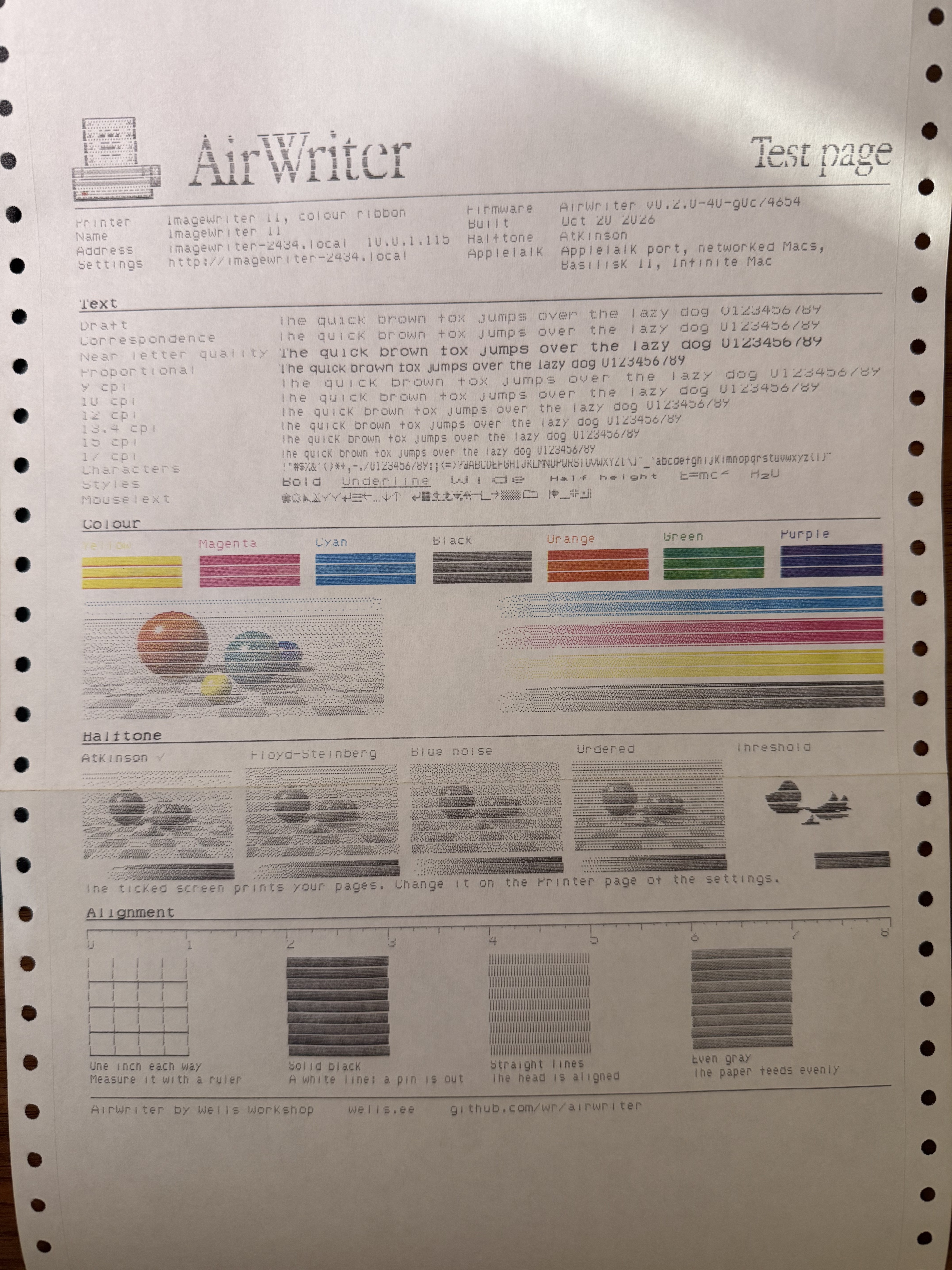
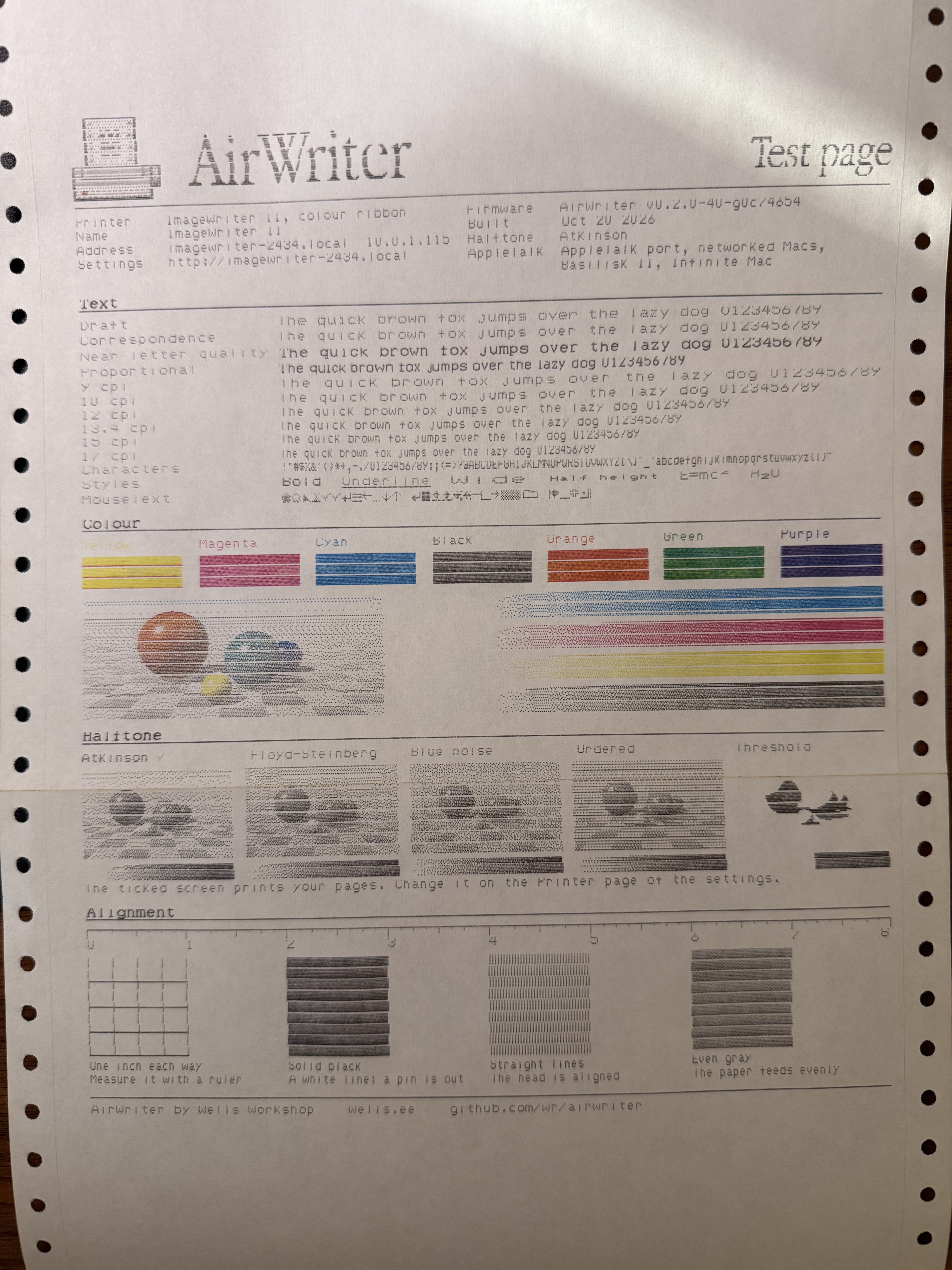
    There's a full test page now too. It has a letterhead, every built-in font in each pitch and style, the colors, a little ray-traced still life and the five dithers side by side, plus a ruler to check the paper's lined up. You can print it from the settings page or the button on the board.

  • EtherTalk over Wi-Fi

    Wells Workshop • 10/22/2026 at 17:54 • 0 comments

    My SE/30 has a BlueSCSI with Wi-Fi, which the Mac sees as an Ethernet card. So AirWriter speaks EtherTalk over Wi-Fi now too, and the SE/30 finds it in the Chooser with no LocalTalk cable at all.

    After that I added emulators. Basilisk II reaches it through its AppleTalk tunnel, and Infinite Mac can print to it right from a browser tab. It's all one printer, so whoever prints first goes first and everyone else waits their turn.

  • Dithering options

    Wells Workshop • 10/22/2026 at 17:53 • 0 comments


    Atkinson is still the default, since it's what the original Mac used, but I wanted to see what else the ImageWriter could do. There are five to pick from now: Atkinson, Floyd-Steinberg, blue noise, Bayer and plain threshold. The settings page draws a preview of each one as ink dots, so you can see what you'll get before you print.

    I also tried correcting for dot gain, since the ribbon's ink spreads and makes everything print darker than it should. I printed the same dusk photo with no correction, 10% and 20%, and the uncorrected one looked closest to the screen, so the correction is off by default.

  • Color

    Wells Workshop • 10/22/2026 at 17:52 • 0 comments

    With Apple's color ribbon in, AirWriter prints in color now! The printer will tell you which ribbon is in if you ask it, so AirWriter checks before every job. With the color ribbon in, the iPhone's print sheet offers color. With the black one it's black and white only, and the settings page shows which one it found.

    Each strip of the page goes across four times, once per ink, in the order yellow, magenta, cyan and black.

  • LocalTalk is listening

    Wells Workshop • 10/15/2026 at 23:44 • 0 comments

    The second port is to support LocalTalk networks. There's a LocalTalk Option Card for ImageWriter II which is both rare and incredibly expensive. AirWriter now adds this functionality to any unmodified ImageWriter printer!

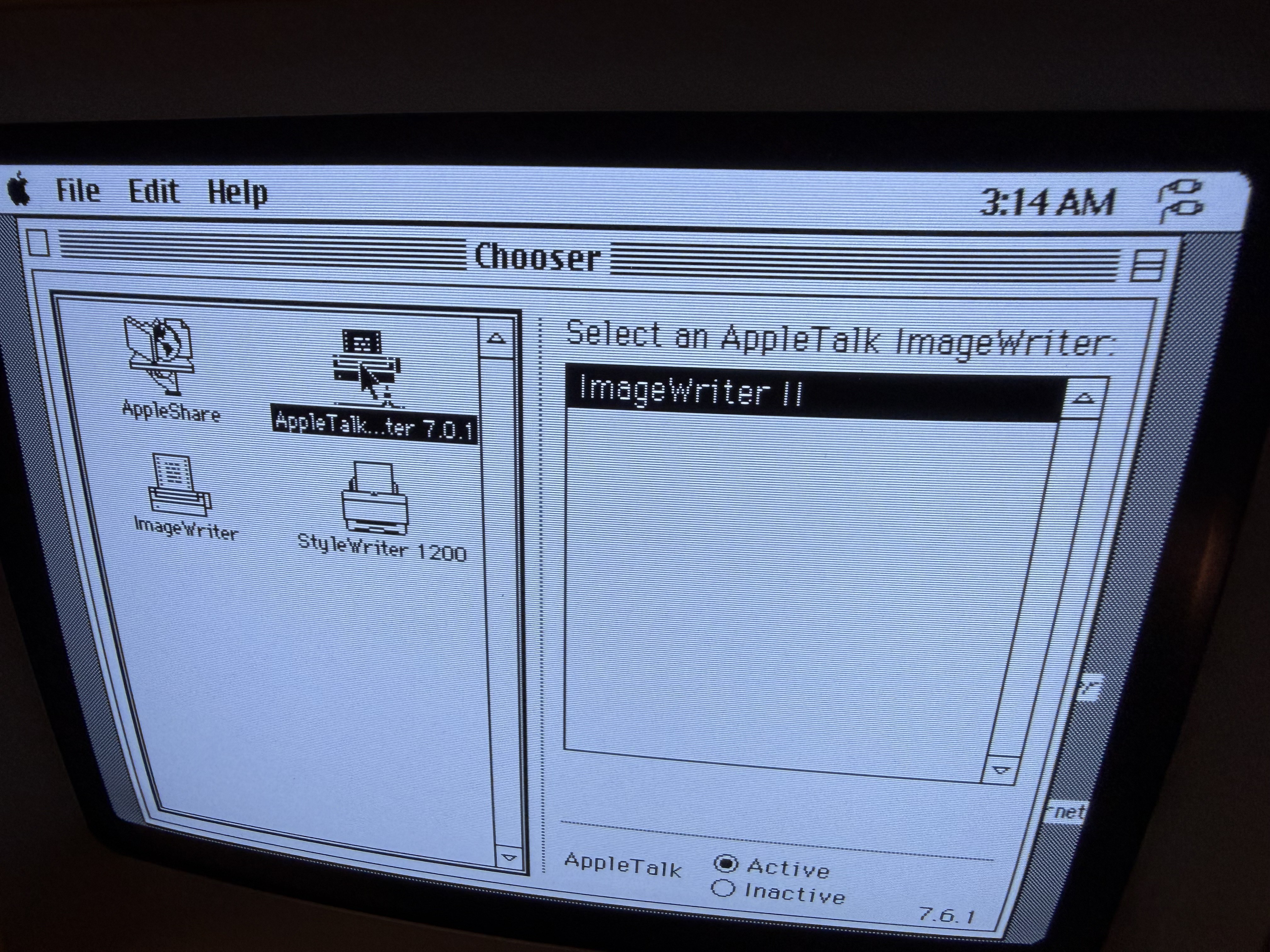
    When a vintage Mac opens the Chooser, AirWriter is detected by the Mac as an AppleTalk ImageWriter II and happily prints to it now!!

  • Paper out

    Wells Workshop • 10/15/2026 at 23:44 • 0 comments

    When the printer runs out of paper, AirWriter now pauses the job and the phone tells you to check paper and SELECT. At one point I added an extra printing feature and the iPhone just sat at "Waiting" forever, so that came back out. Cancelling a job halfway through a line also used to make the next page print garbage. Now it resets the printer before the next job.

  • Boards are here

    Wells Workshop • 10/15/2026 at 23:43 • 0 comments

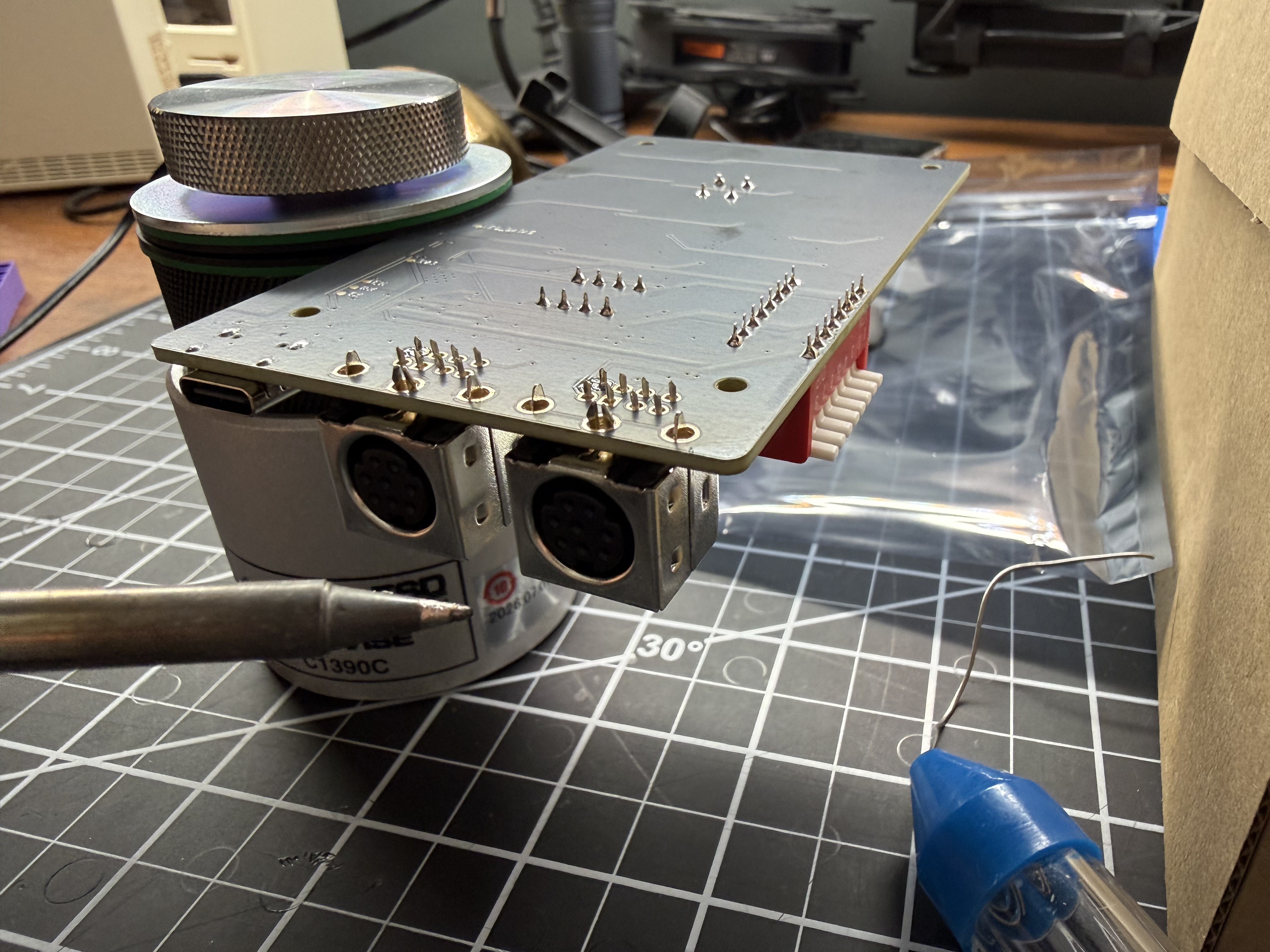
    The boards came back from PCBWay, and I soldered on the two mini-DIN ports by hand. The LocalTalk chip is a PIC, and rather than buy a programmer I had the ESP32 program it right in its socket. That took a couple of tries.

    The first print came out exactly the same as the laptop version, byte for byte, which was a relief. A full-page photo from my iPhone takes about two minutes to print. I also printed a case for it, which took a few rounds to get right. The board slides in past a flexible wall on one side.

  • The art panel

    Wells Workshop • 10/15/2026 at 23:43 • 0 comments

    I tried a few looks for the front before landing on this one. It's a second PCB that snaps off the same panel as the main board and has no components at all. I draw the art in Figma, and a script turns the export into a KiCad board, with each colour mapped to a PCB material. Bare FR4 lets the LEDs through in full colour, soldermask turns them teal, and the gold dots stay dark.

    The first version would have leaked light everywhere, because black soldermask lets teal light through. So the back of the panel is solid copper, with holes only behind the dots that are meant to light up.

  • Printing to nothing

    Wells Workshop • 10/15/2026 at 23:43 • 0 comments

    The boards were weeks away, so I started on the firmware without them. I set up a fake printer on my laptop, printed to it from my iPhone and saved what came through. That gave me a real AirPrint job to test against, and the whole pipeline got built and tested on the laptop first, then on an ESP32 devkit. Long before the boards arrived, the devkit was showing up in the iPhone's print sheet, with no printer attached.

View all 9 project logs

Enjoy this project?

Share

Discussions

Similar Projects

Does this project spark your interest?

Become a member to follow this project and never miss any updates