Close
0%
0%

GPRino

Ground Penetrating Radar using Arduino

Similar projects worth following
This project developed a very low cost (under 300 USD components cost) Ground Penetrating Radar. The acquired data can be visualized onboard, in real time, as well as stored and transferred to a PC for further processing. The digital section uses an Arduino Mega 2560 board. The onboard visualization uses an LCD shield for Arduino Mega 2560. The analog section is custom built. The frequency range is 323 MHz - 910 MHz.

The construction and software files contain the complete information for building the project.

Operation_Instructions.txt

Operation instructions

plain - 2.86 kB - 09/26/2026 at 19:04

Download

Software_stacked_version.zip

Arduino and PC (in LabVIEW 2013) software source code (performs decimation and stacking on scan samples)

x-zip-compressed - 920.25 kB - 10/07/2026 at 16:17

Download

Antennas_v2.zip

Antennas - New version of antennas, must be printed on double-sided PCB FR4 laminate size A4 (210 x 297 mm). PDF for Toner Transfer construction (Top layer mirrored) and GERBER files

x-zip-compressed - 70.87 kB - 05/15/2024 at 11:54

Download

PCB_Construction_Toner-Transfer_Method.zip

PCB images in PDF for Toner Transfer PCB construction (Top layer mirrored), and schematics

x-zip-compressed - 1.93 MB - 08/27/2025 at 09:16

Download

LF(GPR_LF).zip

OrCAD 9.2 design files and Gerber for Low Frequency board

x-zip-compressed - 159.42 kB - 06/07/2025 at 18:40

Download

View all 9 files

  • 1 × Arduino Mega 2560
  • 1 × LCD TFT 3.2 inch + slot SD card shield for Arduino Mega LCD TFT 3.2 inch 480 x 320 Pixels + slot SD card, using HX8357 chip
  • 1 × JTOS-850VW+ VCO
  • 1 × PAT-15+ Non-IC RF, IF, RFID, ZigBee Components / Attenuators
  • 2 × PSA4-5043+ LNA

View all 49 components

  • 19.10.2020

    Mirel Paun • 10/19/2020 at 14:14 • 0 comments

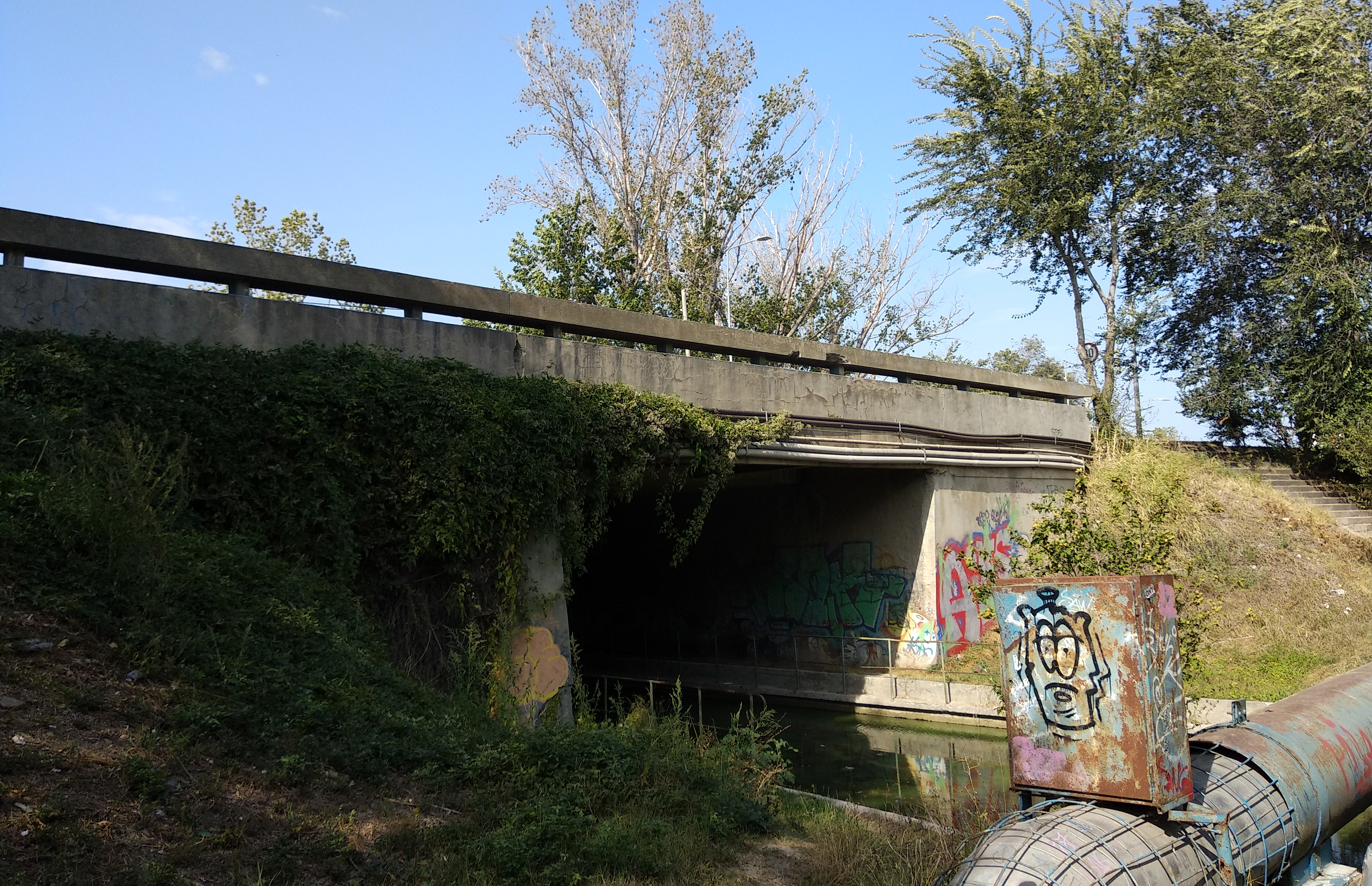
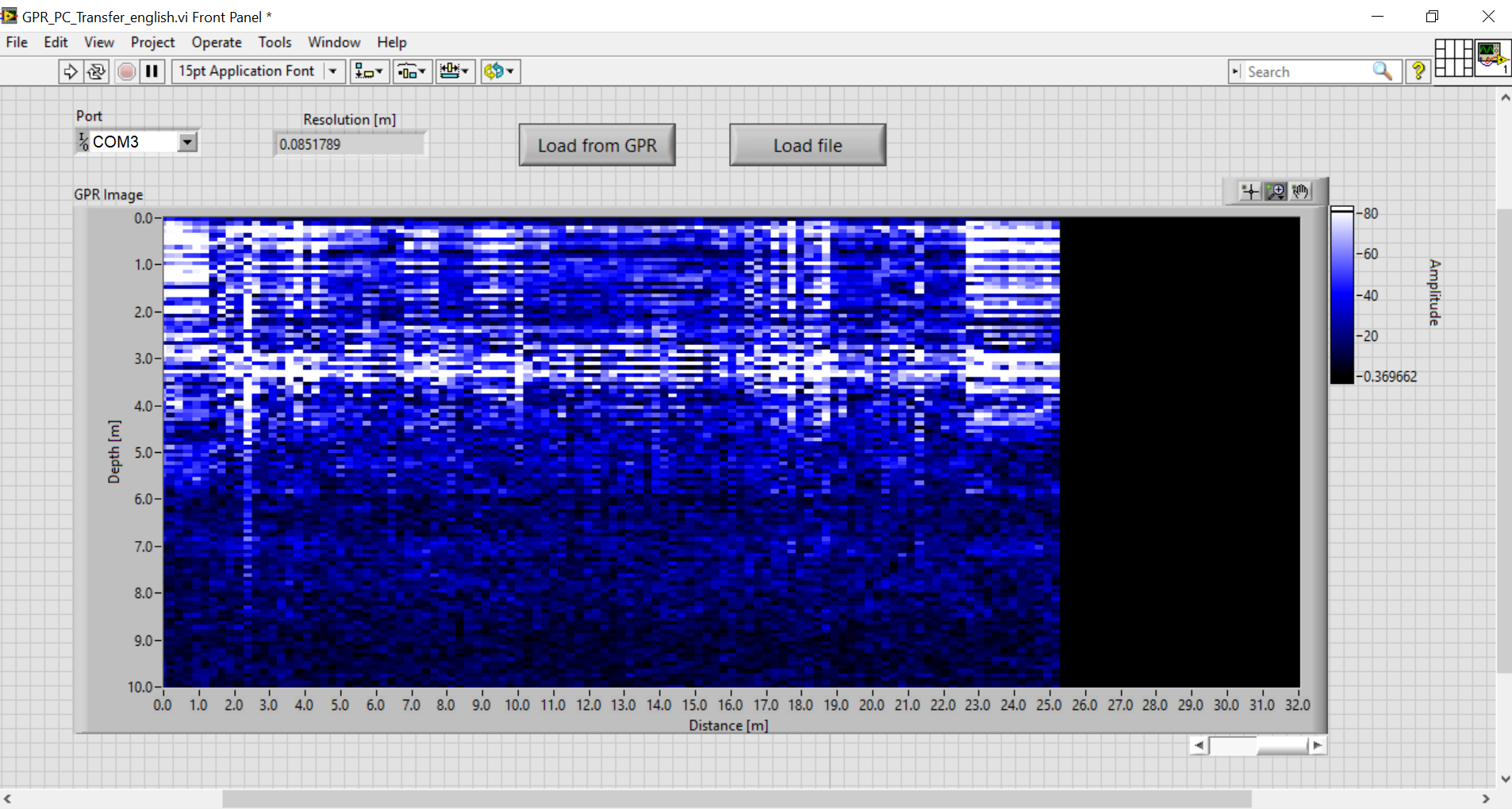
    System tested on a bridge. This is the GPR image obtained for the bridge in the photo:

  • 08.10.2020

    Mirel Paun • 10/08/2020 at 16:03 • 0 comments

    System tested and works fine.

    Antenna coupling is quite high. Would be nice placing the antennas at a bigger distance from each other, or using more directive antennas in order to reduce unwanted coupling.

View all 2 project logs

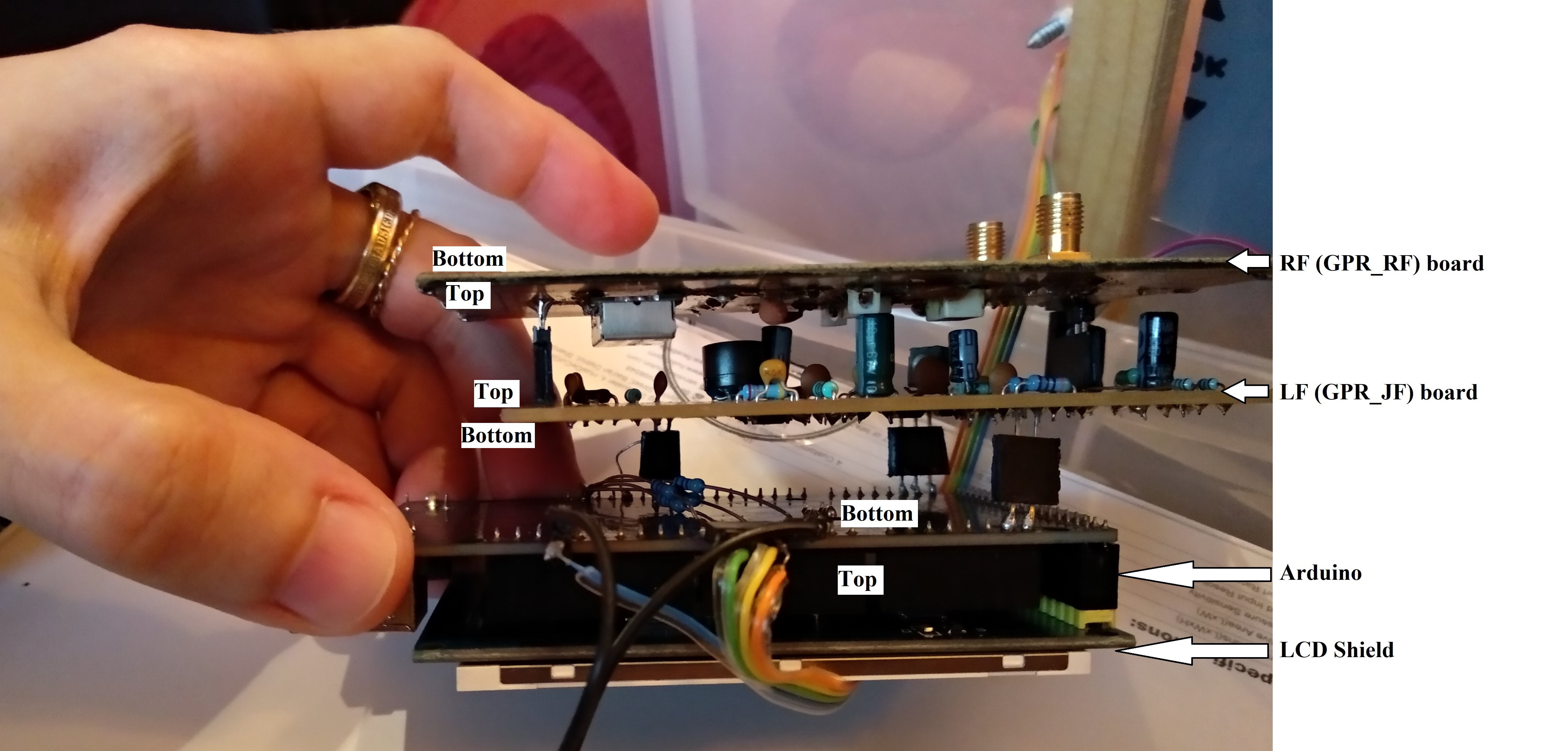
  • 1
    Board stack.
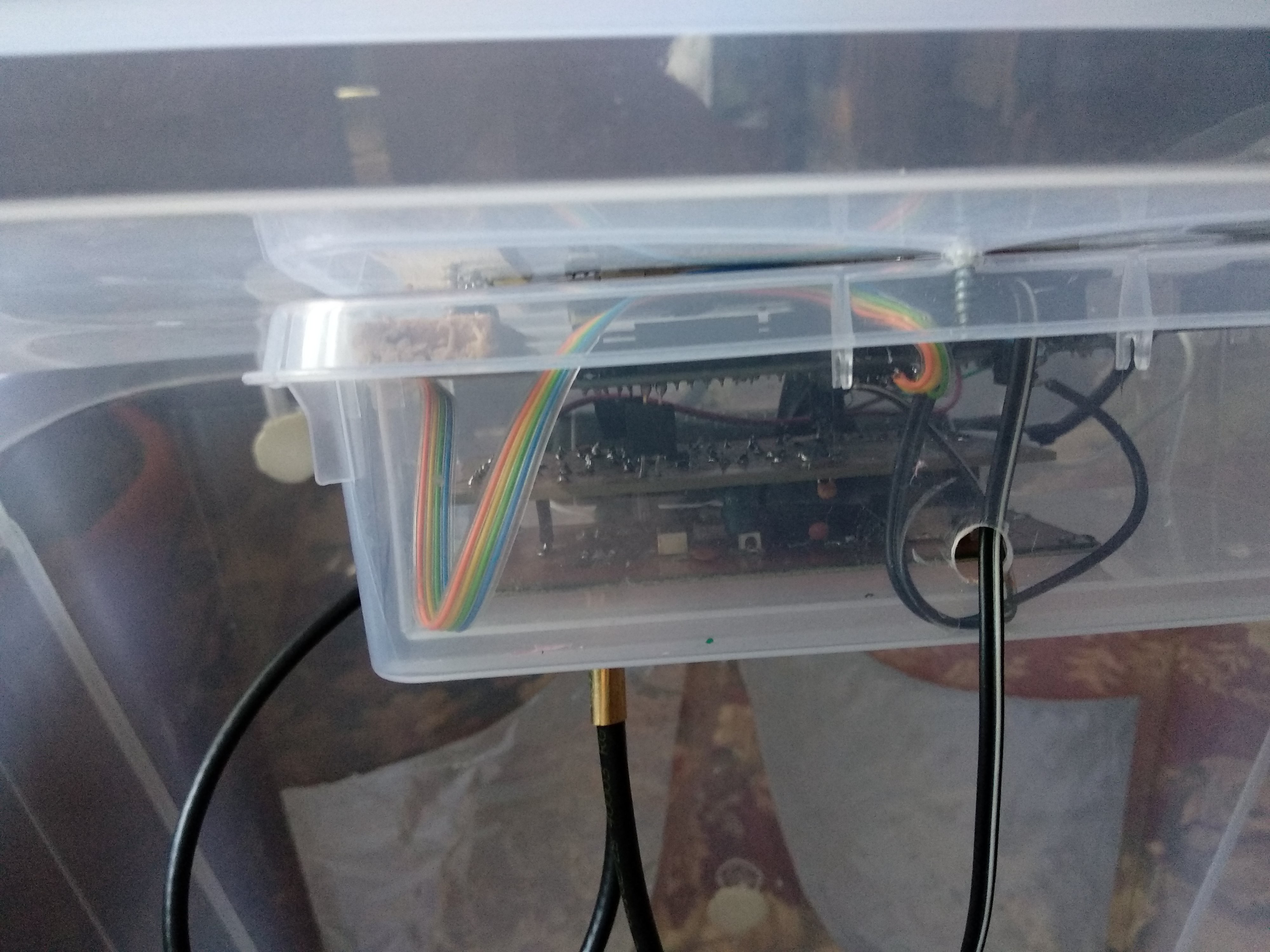
  • 2
    Board stack in box

    This is how the electronic boards are stacked.

  • 3
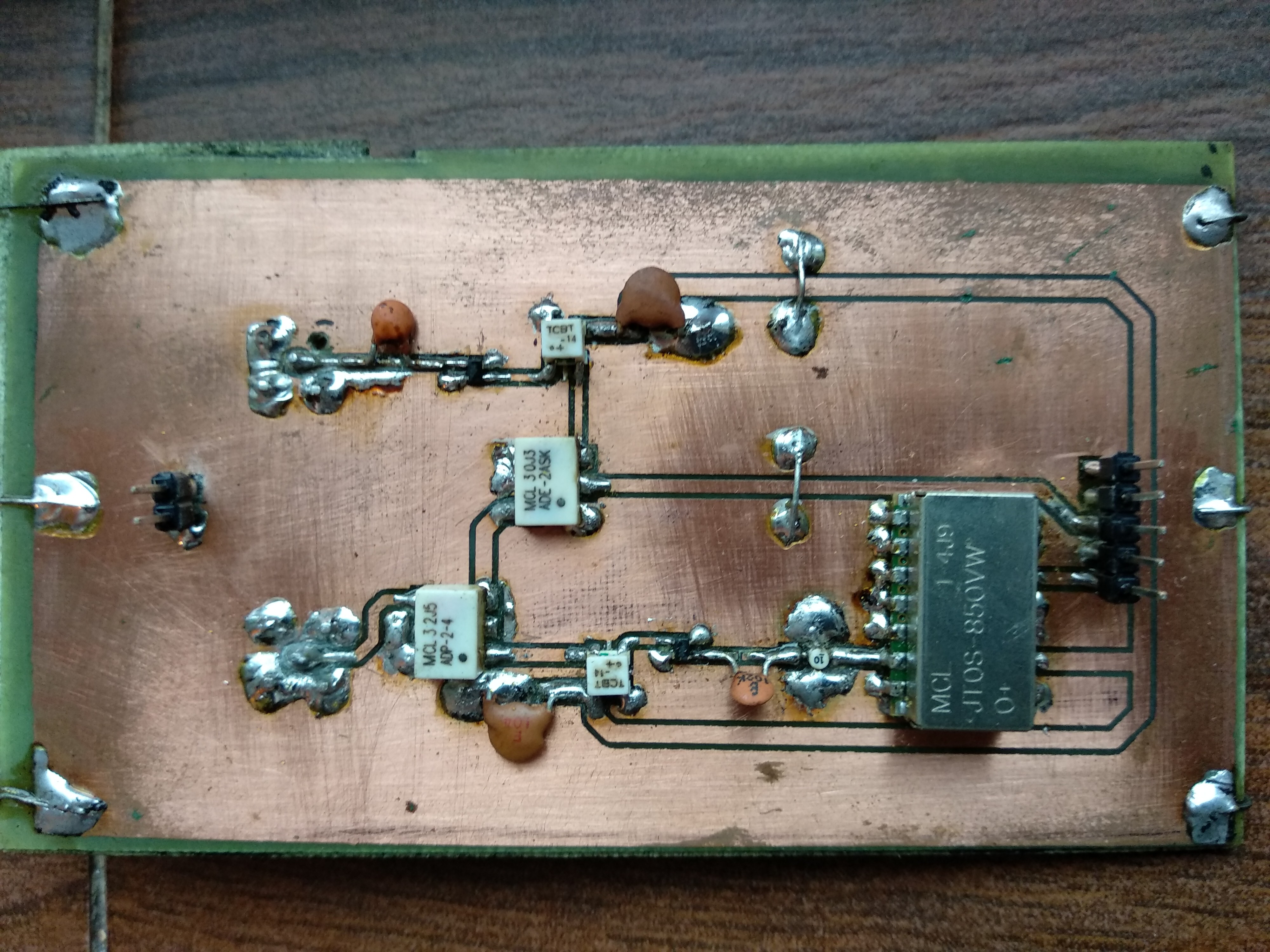
    RF (GPR_RF) board top.

View all 9 instructions

Enjoy this project?

Share

Discussions

Dan wrote 4 days ago • point

library(RGPR)
x <- readGPR(dsn = "D:/test.txt")
#set velocity
vel(x) <- 0.12
#limit to first 500 depth samples
x1 <- x[1:500, ]
#dewow filter
x2 <- dewow(x1, type = "Gaussian", w = 20)
#depth attenuation compensation
x3 <- gain(x2, type ="exp", alpha = 0.01347, t0 = 0, te = 110)
#filter clutter
data_matrix <- values(x3)
mean_profile <- rowMeans(data_matrix)
clean_matrix <- data_matrix - mean_profile
x_clean_alt <- x3
values(x_clean_alt) <- clean_matrix
#plot
plot(x_clean_alt, col = palGPR("grey2"))

This doesn't work with the new stacked code. I'm not sure I understand it enough to make the necessary changes, any help here would be appreciated.

  Are you sure? yes | no

Control_Eng wrote 4 days ago • point

It is working for me when x1 <- x[1:500, ] is x1 <- x[1:250, ]

  Are you sure? yes | no

Dan wrote 3 days ago • point
Scan of my driveway. Concrete, 2.5m depth, 7000 LCD reference, 9000 vi reference. The weird anomaly in the center is when I went slightly under my truck bed, at that point I moved over about 1m and went backward the same distance.
https://myimgs.org/storage/images/58648/Driveway-Raw.jpg
https://myimgs.org/storage/images/58649/Driveway-vi.jpg
https://myimgs.org/storage/images/58650/Driveway-RGPR.jpg

  Are you sure? yes | no

Control_Eng wrote 3 days ago • point

Just as a thought, the scan seems to show the roof of your driveway, when you reach your truck (metal) there should be a huge amount of reflections that’s maybe the reason why you saw this anomaly in this shape. I guess the same case might show if you scan while a human passes under you (huge amount of water inside the body). 

This is my simple analysis it might be wrong.

  Are you sure? yes | no

Control_Eng wrote 4 days ago • point

@Mirel Paun this is my first real test, anntenas are bowtie with no shield above them, distance between them around 55cm and they are 2cm above the ground with wheel type (i did make wood slider with 4 wheels and a trigger on one wheel), concrete mode with depth 2.5m, the test is on large bridge under me there where three concrete holders for the bridge, even with 7000 it didn't show as white pixles and I did feel that the holders didn't show as what they supposed to be, I did got this kindly can you help me in reading it to decide if I have faults

https://myimgs.org/image/HWXBX8kX

https://myimgs.org/image/hpIcAxic

  Are you sure? yes | no

Mirel Paun wrote 4 days ago • point

I think you should repeat the test with the 30dB attenuator and see what it shows. The reflections are quite week, maybe there's some faulty connection to the antennas.

  Are you sure? yes | no

Control_Eng wrote 4 days ago • point

This is a test with 30db attenuator connected using 3m cable and the debug version, I guess it is perfect, what you think my issue might be, the anntenas are cooper and I did test them on tinySa they are getting signals like I connect one anntena to the tinySa and the other to GPRino tx and I did got the signal on the screen idel (just plug Arduino with power) around  660Mhz 

https://myimgs.org/image/ZrShkuFq

  Are you sure? yes | no

Control_Eng wrote 4 days ago • point

@Mirel Paun  mabye my issue related to my soldering of the SMA connector since my attenuator test is ok, what do you think, 

https://myimgs.org/image/OUA7b72B

In all cases I am now working to make the distance between the anntenas edge's 1m and I will but 45*45cm steal plate 15cm above the anntenas, but kindly I need your recommendations.

After do this test and make 1m between the anntenas with steal on top the signal reduced to about 2000 not more while for 7000 it is working only without steal and the distance no more 30cm what is your opinion 

Sometime even a green pixles shows on the lcd screen that's up normal 

  Are you sure? yes | no

Dan wrote 5 days ago • point

This is the latest images after removing the battery sampling from the code. I didn't realize that it was now using every once of speed the arduino can muster...

https://myimgs.org/storage/images/57490/StackedSample.jpg

https://myimgs.org/storage/images/57491/StackedImage.jpg

The reference value is set to 7000 in the arduino and the .vi which seems good.
The scan is a simple back and forth over the same spot in my office and the settings are:

Concrete
depth = one meter
distance  = 3 meters

  Are you sure? yes | no

Mirel Paun wrote 5 days ago • point

Looks pretty good now. I guess the white spots are rebar.

  Are you sure? yes | no

Dan wrote 6 days ago • point

Is there a better place to communicate about this GPR project? This seems clunky here and we can't share images and code easily.
I have not had any luck at all with the latest code, all I get are bands of dark - light - dark - light. I'm going to work on mine a little more today.

  Are you sure? yes | no

Mirel Paun wrote 6 days ago • point

And the old code runs OK? It's strange, because I tested it on my hardware and it worked fine. Maybe something broke in the hardware?

  Are you sure? yes | no

Dan wrote 5 days ago • point

I noticed that you removed the battery level meter code. I kept it in mine, could that be the issue?

  Are you sure? yes | no

Dan wrote 5 days ago • point

Yes, the old code and the old .vi work pretty good. 

  Are you sure? yes | no

Mirel Paun wrote 5 days ago • point

Yes, absolutely if you kept the battery level meter it interferes with the new faster sampling strategy I implemented. Use the new code exactly as it is. The battery meter was useless anyway because powerbanks always give 5V at their outputs, so you have to check their integrated level meter. 

  Are you sure? yes | no

Dan wrote 5 days ago • point

This is what I get now, I have taken several readings:

https://myimgs.org/storage/images/57082/StackedLCD1.jpg
https://myimgs.org/storage/images/57087/StackedImage.jpg

  Are you sure? yes | no

Control_Eng wrote 5 days ago • point

@Dan I am with you in finding a better way to commuincate since me and you I guess the only persons that reach to full model of the GPRino device. During my test I did face issue like yours (the one in the images) it was due to lossey connection between the RF and LF. @Mirel Paun I did make another design like you did in your handheld version what you think is better the one with wheel or this one since I guess the annetans will not be at fix distance from the ground all of the time due to the movement. One last question how to define that 7000 value is the best since new 64 sample start to give white reflections on this value but also 3000 give also but larger amount ?

  Are you sure? yes | no

Mirel Paun wrote 5 days ago • point

@Control_Eng Use the new code exactly as I uploaded it, without Battery meter, otherwise will not work. The wheel version is better than handheld, but the handheld one is more handy in certain scenarios, and can be made also easier to carry disassembled. The default reference value I obtained from experiments is 12000.

  Are you sure? yes | no

Control_Eng wrote 5 days ago • point

Yes I did use it as is. if 12000 gave you the correct behave then in my case why at 7000 I did start to see the old 256 sample behave is because my testing senario (room floor) or I have issues in my signals, when I did test it with 30db antteuator it gave me a good shape of sine waves?

this is my .vi after test with 12000 

https://myimgs.org/image/h1jA3DG0

and this is my .gpr 

https://storage.to/21unwXp9R

  Are you sure? yes | no

Mirel Paun wrote 5 days ago • point

The sine waves were OK. Probably the difference is from the antennas, because I use now bow-tie antennas with back reflector, so the echo signal is higher for me, so 7000 for you gives the results I have at 12000.

  Are you sure? yes | no

Control_Eng wrote 10/07/2026 at 13:04 • point

Dear @Mirel Paun  I did test it with the 64 sample, it starts to give LCD white pixles at 7000, above that mostly it shows light black and gray scale only. 

  Are you sure? yes | no

Control_Eng wrote 09/26/2026 at 20:44 • point

Hello @Mirel Paun after enhance some of connections, I got these debug image with the 30db antteuator, what do you think (I guess now my GPRINO should work perfectly), 

https://myimgs.org/image/cW0tRU7X

I have three questions on it:

1. Why the sine wave is almost disapear starting from 150 sample index,

2. The previous image is without the powerbank connected since after connect it and test I feel that the sine waves become larger, 

https://myimgs.org/image/7Ri3GIXD

3. Finally, I did got multiple since waves because we are taking 256 sample per each scan right ?

  Are you sure? yes | no

Mirel Paun wrote 09/27/2026 at 10:11 • point

Yes, looks perfect now.

1. The sine wave diminishes after 150 samples because the power generated by the JTOS oscillator decreases with increasing frequency. It is an imperfection of the oscillator described in its datasheet.

2. The signal increases after using the powerbank because the powerbanc gives a bit higher voltage than the USB (4.8V USB vs. 5V powerbank).

3. Each measuring position (a scan) is 256 samples. It produces a vertical column in the image after FFT processing. When moving the device takes scan after scan to create the image (column after column).

I uploaded here and on GitHub a new version of the programs (Arduino and PC) which performs decimation of the scan samples to 64 samples, then mediates over consecutive 4 scans (procedure called stacking) and then processes by FFT the resulting 64 samples decimated and stacked signal. It also samples 1.5 faster. This procedure decreases the maximum displayed depth by 1/4 to aprox. 7m in air, but theoretically improves SNR and sensitivity. You can give it a try and compare the results.

  Are you sure? yes | no

Control_Eng wrote 09/27/2026 at 12:04 • point

Thanks @Mirel Paun, this 

https://myimgs.org/image/S20sFY9I

is after the 64 sample edit, and I did notice that the amount of white pixles on on the arduino mega screen become almost not there, only black pixles above the usual at 0 depth, 

  Are you sure? yes | no

Mirel Paun wrote 09/27/2026 at 12:26 • point

It should behave more stable and be more sensitive in this version with decimaton and stacking. At least this is what theory says.

  Are you sure? yes | no

Control_Eng wrote 09/27/2026 at 20:56 • point

Hello @Mirel Paun good evening, I did test for the same area as I did for the old code before the 64 sample edits, 

Here is the resutls for images (vi+RGPR)

https://myimgs.org/image/IYi0tQlT

https://myimgs.org/image/OLLu6m1Q

And this is the .gpr file, 

https://storage.to/ljnNYR3Jn

I noticed something unusual in the VI graph. It still shows some white areas, but they are much smaller than in my previous test (in the 256 sample). Since I was testing over a concrete floor, I expected the white region to be larger because the concrete should produce a relatively strong reflection (it almost was showing that in the old one as near continious line of white pixles).

What is even more unusual is that, during the test, the Arduino screen did not show any white pixels at all. It displayed only black and gray areas. Similar to this image

https://myimgs.org/image/mFkUBHuA

  Are you sure? yes | no

Dan wrote 09/27/2026 at 21:31 • point

I had similar results on the gpr screen. I have not installed the new vi program, so I’m anxious to see what that looks like for me.

I also am scanning through a layer of concrete foundation.

  Are you sure? yes | no

Mirel Paun wrote 09/28/2026 at 08:37 • point

For the LCD problem, try increasing the reference maximum value by pressing the UP button when the device is standing still. The default value is 12000. Try increasing it so that the image becomes OK on the LCD. And please tell me at what value the image is OK.

Regarding the concrete floor, I don't know why it looks different now, in theory it should be better now. Maybe there is an inhomogeneity in the middle section of the concrete slab (some insertion) and now it became visible.

  Are you sure? yes | no

Control_Eng wrote 09/28/2026 at 06:59 • point

@Dan hello Dan, yes this new thing I am testing after Mirel change the sample rate to be 64 vs 256 old one, this reduce the depth but should enhance the results.

  Are you sure? yes | no

Dan wrote 09/29/2026 at 00:53 • point

how do I install the new .vi file. The only way I've done it in the past is with the installer program.

  Are you sure? yes | no

Control_Eng wrote 09/30/2026 at 12:19 • point

@Dan as far I know (how I did it) .vi will not work without labView installed in your computer, I did install it and activate using student license, then you can run the .vi

  Are you sure? yes | no

Dan wrote 09/22/2026 at 11:39 • point

When I load the data from the GPR to the GPRino tool, the depth scale seems to be wrong. My setting on the GPR was only for a depth of just over 2 meters, but when it;s imported, the depth goes all the way to 13 meters.
Is there something I am doing wrong?

  Are you sure? yes | no

Mirel Paun wrote 09/22/2026 at 12:19 • point

There is no problem. It always stores all depth data no matter what the visualisation setting was on the LCD, which is 13 meters in air. You can modify the scales in the PC program at wish. 

  Are you sure? yes | no

Mirel Paun wrote 09/27/2026 at 10:11 • point

I uploaded here and on GitHub a new version of the programs (Arduino and PC) which performs decimation of the scan samples to 64 samples, then mediates over consecutive 4 scans (procedure called stacking) and then processes by FFT the resulting 64 samples decimated and stacked signal. It also samples 1.5 faster. This procedure decreases the maximum displayed depth by 1/4 to aprox. 7m in air, but theoretically improves SNR and sensitivity. You can give it a try and compare the results.

  Are you sure? yes | no

Control_Eng wrote 09/21/2026 at 17:09 • point

Hello @Mirel Paun good day, after test it with 30db 3w anntteuator and 3m cable I did got this graph in the debug mode, is this ok ? 

https://myimgs.org/image/pW2q2tUm

  Are you sure? yes | no

Mirel Paun wrote 09/21/2026 at 17:53 • point

Looks relatively well. Ideally it should be more like a constant amplitude / frequency sine wave. Your signal has some distorsions, but it it pretty good.

  Are you sure? yes | no

Control_Eng wrote 09/23/2026 at 13:23 • point

After ensuring on some connections I got this with 30db anettuator, 

https://myimgs.org/image/YDZbEYmJ

Then after doing test on my room floor with another room under me I got this wwith concret mode, 

https://myimgs.org/image/1Y1nX7HC

And this is the .vi software 

https://myimgs.org/image/UKRcf2YB

And the RGPR R lib

https://myimgs.org/image/4JDi2g2k

What your analysis for the new debug image ? and what do you think, do it worth to start real test ?

  Are you sure? yes | no

Mirel Paun wrote 09/23/2026 at 17:10 • point

There is some distortion in the debug signal, I don't know where it comes from, maybe a faulty connector. But overall it looks OK.

In RGPR try this:

library(RGPR)
x <- readGPR(dsn = "D:/test.txt")
#set velocity
vel(x) <- 0.12
#limit to first 500 depth samples
x1 <- x[1:500, ]
#dewow filter
x2 <- dewow(x1, type = "Gaussian", w = 20)
#depth attenuation compensation
x3 <- gain(x2, type ="exp", alpha = 0.01347, t0 = 0, te = 110)
#filter clutter
data_matrix <- values(x3)
mean_profile <- rowMeans(data_matrix)
clean_matrix <- data_matrix - mean_profile
x_clean_alt <- x3
values(x_clean_alt) <- clean_matrix
#plot
plot(x_clean_alt, col = palGPR("grey2"))

  Are you sure? yes | no

Control_Eng wrote 09/23/2026 at 19:57 • point

I did make longer test (I guess the .gpr is consist of the old one and the new one you can see the dif from the graph). Here are the images:

vi

https://myimgs.org/image/ozRCKPx6

PGPR

https://myimgs.org/image/XEyf9QyP

  Are you sure? yes | no

Dan wrote 09/04/2026 at 18:03 • point

So I just tried for the first time to load the file to the GPRino_v2.vi program and am getting nothing but a black screen. 

When I click the 'Load from GPR' button and name the file, it resets the unit and after a little bit the screen says "Done". It changes the resolution from 0 to 0.278293 and sets the Amplitude to 120, but the screen remains black. 

I never get a screen that asks if I want to delete the file on the SD card, the lcd just goes back to the Waiting to connect screen.
I have verified the com port and it is communicating, hence the reset, but no data is ever displayed on the PC.

What am I doing wrong?

  Are you sure? yes | no

Dan wrote 09/04/2026 at 18:31 • point

I was able to successfully open it by putting the SD card in the PC and opening the Data.gpr file. So I am assuming a communication error??? Transfer speed maybe?

  Are you sure? yes | no

Dan wrote 09/04/2026 at 21:23 • point

After digging in a little, I believe it's because I am using the Keyestudio Mega2560 USB-C version which has a CP2102 USB to serial IC. 

That IC resets the Arduino via a DTR command every time the serial port is opened. If the GPRino code included a command to hold the DTR inactive, it would solve the issue I think.

UPDATE: Yep, I removed the cap that links the CP1202 DTR reset line from the rest of the curcuits reset system and Viola, I can now download directly from the GPR to the GPRino program.

  Are you sure? yes | no

Mirel Paun wrote 09/05/2026 at 10:20 • point

So the problem was the reset circuit. I'm glad you solved it.

  Are you sure? yes | no

Dan wrote 09/13/2026 at 22:58 • point

Yes, I had to rewire a capacitor on the Keyestudio (Arduino) board that connected the CP2102 DTR line to the reset circuit of the ATMEGA ic. I ended up using a switch to connect or disconnect that line depending on whether I wanted to download program updates, or upload GPR data. Just In case anyone else runs into this problem.

@Mirel Paun I am happy to share all my PCB gerber files, schematics (in PDF form), and the converted Arduino code that allows for a different LCD screen. Let me know if you want me to send them to you.

  Are you sure? yes | no

Dan wrote 09/01/2026 at 22:47 • point

Curious what this section of code is doing, looks like it's setting the amplitude of the signal from the antenna, but I want to be sure:

// ------------------------------------------------------------------------------
// Reference Level Function
// ------------------------------------------------------------------------------
void check_reference_level()
{
  if (!digitalRead(button_down))
  {
    if (max_amplitude > inf_lim_max_amplitude)
      max_amplitude -= 1000;
    else
      max_amplitude = inf_lim_max_amplitude;

    delay(500);
  }
  else if (!digitalRead(button_up))
  {
    if (max_amplitude < sup_lim_max_amplitude)
      max_amplitude += 1000;
    else
      max_amplitude = sup_lim_max_amplitude;

    delay(500);
  }
}

  Are you sure? yes | no

Mirel Paun wrote 09/02/2026 at 06:21 • point

The section you pointed out lets you set de reference (maximum) level used for plotting the GPR image (using the up down buttons). The lower this level is, the whiter the image becomes. It's the same as playing with the 120 limit in the LabVIEW .vi (the scale on the right of the graph).

  Are you sure? yes | no

Dan wrote 08/31/2026 at 00:10 • point

BTW, I am willing to sell a set of these antennas for $100 US, but it would be a couple of weeks to have them made since I only have one extra (not a set) right now. I can also provide the Altium files with gerbers for free if you want to get your own made.
I noticed though that you are not wanting Vivaldi style antennas. 

  Are you sure? yes | no

Dan wrote 08/30/2026 at 23:48 • point

I figured I'd post a few more images in case it helps:
https://myimgs.org/storage/images/32676/IMG_1767.jpg
https://myimgs.org/storage/images/32677/IMG_1770.jpg
https://myimgs.org/storage/images/32678/IMG_1771.jpg
https://myimgs.org/storage/images/32679/IMG_1773.jpg

I took some samples across this bridge:
https://myimgs.org/storage/images/32680/IMG_1776.jpg

Sorry for the terrible images, it was hot and sunny out and really hard to get any good pictures: 
https://myimgs.org/storage/images/32698/IMG_1780.jpg
https://myimgs.org/storage/images/32700/IMG_1781.jpg
https://myimgs.org/storage/images/32701/IMG_1779.jpg
https://myimgs.org/storage/images/32702/IMG_1777.jpg

You can definitely see the outline of the walls of the wash. I only tried this with concrete and asphalt velocities, but it would be interesting to get scans using every medium.

  Are you sure? yes | no

Mirel Paun wrote 08/31/2026 at 09:39 • point

The device looks very well. The GPR images are nice. Would be interesting to know what a professional GPR operator thinks about our images, because I am not a professional in this field and I never used a GPR other than my own prototypes, so I don't have a comparison term.

  Are you sure? yes | no

Mirel Paun wrote 09/20/2026 at 06:04 • point

You can try this RGPR data processing. Has interesting results:

library(RGPR)
x <- readGPR(dsn = "D:/test.txt")
#set velocity
vel(x) <- 0.12
#limit to first 500 depth samples
x1 <- x[1:500, ]
#dewow filter
x2 <- dewow(x1, type = "Gaussian", w = 20)
#depth attenuation compensation
x3 <- gain(x2, type ="exp", alpha = 0.01347, t0 = 0, te = 110)
#filter clutter
data_matrix <- values(x3)
mean_profile <- rowMeans(data_matrix)
clean_matrix <- data_matrix - mean_profile
x_clean_alt <- x3
values(x_clean_alt) <- clean_matrix
#plot
plot(x_clean_alt, col = palGPR("grey2"))

  Are you sure? yes | no

Dan wrote 09/20/2026 at 12:23 • point

https://myimgs.org/storage/images/41594/testone.png

I did a quick scan in my house and loaded it to RGPR, this is the result.

Do you think it would be better to load the converted .gpr file?
My goal is to do a grid scan and reconstruct the grid in a 3D plotting program. I think RGPR could be made to do that.  I'd love to hear your thoughts and pointers.

  Are you sure? yes | no

Mirel Paun wrote 09/21/2026 at 08:36 • point

This processing reduces clutter by reducing the constant features that appear in horizontal lines. So it eliminates antenna-soil reflection and other horizontal constant reflections.

The image looks clearer than without this processing, so localised object are more visible.

Yes, I think it is better to use this processed image and RGPR has the feature for creating 3D.

  Are you sure? yes | no

Dan wrote 4 days ago • point

is there a different version of this for the new stacked code?

  Are you sure? yes | no

Mirel Paun wrote 4 days ago • point

For the stacked code the processing in RGPR is:

library(RGPR)
x <- readGPR(dsn = "D:/test.txt")
#set velocity
vel(x) <- 0.12
#limit to first 250 depth samples
x1 <- x[1:250, ]
#dewow filter
x2 <- dewow(x1, type = "Gaussian", w = 20)
#depth attenuation compensation
x3 <- gain(x2, type ="exp", alpha = 0.01347, t0 = 0, te = 110)
#filter clutter
data_matrix <- values(x3)
mean_profile <- rowMeans(data_matrix)
clean_matrix <- data_matrix - mean_profile
x_clean_alt <- x3
values(x_clean_alt) <- clean_matrix
#plot
plot(x_clean_alt, col = palGPR("grey2"))

  Are you sure? yes | no

Control_Eng wrote 08/23/2026 at 07:49 • point

Hello @Mirel Paun good day, 

When I look at modern GPR systems such as the LMX, 

https://onesurveying.com/upload/img/UtilityScan-Pro_Data1.jpg

https://telonix.ca/product/lmx200-ground-penetrating-radar-gpr-utility-locating-equipment/

The hyperbola responses are very clear and have a well-defined shape. In our Python debug viewer, I can also see some responses that resemble hyperbolas, but they are much less clear and are often hidden by background response, ringing, or noise.

At this stage, I am not even fully confident that these responses represent real targets. Their color, intensity, and shape are not consistent between repeated test runs, and they are usually quite small and difficult to distinguish. Because of that, it is hard to know whether they are genuine reflections from buried objects or simply artifacts/noise that happen to look like hyperbolas.

Do you think that by applying the right processing filters such as background removal, gain/normalization, band-pass filtering, and possibly migration or hyperbola enhancement we could achieve a display closer to modern commercial GPR systems while still preserving the real target response?

Also, I tried generating a .gpr file from the Arduino debug version. When I open it in the .vi viewer, the radargram appears extremely dark. I can see some blue features, but the overall intensity is so low/dark that it is difficult to distinguish targets or structure. I suspect the amplitude scaling, normalization, or dynamic range used when writing the .gpr file may not match what the viewer expects.

If it might help I can be part of any idea that can do filtering and provide modern look, just lead me and I will be ready to provide help, I did make android application also from the debug one we can work on it if you love.

  Are you sure? yes | no

Mirel Paun wrote 08/23/2026 at 09:24 • point

Hello! I know the images don't look as good as in modern commercial GPRs. I can't figure out the exact source of this difference. I think the problem may be the reduced resolution of the onboard ADC, only 10 bits, while modern systems use something like 16 to 24 bits combined with oversampling or signal stacking. This can only be achieved in our case by redesigning the whole GPR around a more powerful microcontroller board like Arduino GIGA.

I don't know which filtering can improve image quality.

The Arduino debug PC Python version generates .txt files which are not compatible with the .vi viewer, but are compatible with RGPR. They are not depth compensated, so you can play with the depth compensation in RGPR.

  Are you sure? yes | no

Control_Eng wrote 08/23/2026 at 09:29 • point

Aha, so for my case now I am running the debug mode on Arduino Nano that cause issues?.

No, the .gpr I have make it in the arduino code and store it in the card, then run the .vi and import it, 

  Are you sure? yes | no

Mirel Paun wrote 08/23/2026 at 10:31 • point

Nano, Mega, both have 10 bit ADCs so the performance is the same. Only GIGA can offer 16 bit ADCs, but GIGA works at 3.3V and is damaged by 5V signals, so the whole circuit has to be redesigned for it.

If your code stores the data samples exactly like the LCD version, the image should look the same in the LabVIEW .vi.

  Are you sure? yes | no

Control_Eng wrote 08/24/2026 at 14:01 • point

this is the image from the .vi test mode concret, step size 0.083 

https://myimgs.org/storage/images/30191/Screenshot2026-08-24165508.png

and this is the image after convert it using convert and show it in R 

https://myimgs.org/storage/images/30193/Screenshot2026-08-24165941.png

and this is the used code, 

https://limewire.com/d/zfbMn#WJ1eTEGlZ3

I guess I have a critical issue right ?

  Are you sure? yes | no

Mirel Paun wrote 08/24/2026 at 16:33 • point

The code looks fine. But the image doesn't. There is definitely a problem. Can you send me the .gpr file to look at it? 

  Are you sure? yes | no

Control_Eng wrote 08/24/2026 at 17:54 • point

This is the .gpr file, 

https://limewire.com/d/X3R3f#M7M5wuR6WW 

  Are you sure? yes | no

Mirel Paun wrote 08/24/2026 at 19:44 • point

I analysed the .gpr file. The acquired signal's amplitude of your GPR is close to 0. Something is wrong I guess in the hardware. Maybe an RF amplifier is fried or something else.

  Are you sure? yes | no

Control_Eng wrote 08/24/2026 at 21:25 • point

I re-analysed the file I get ADC mean 508.9, average RMS 15.5 ADC counts, average peak-to-peak 113.8 counts, consecutive trace correlation 0.937, and repeatable fraction 0.838. The waveform appears highly repeatable rather than random noise. Can you tell me how I can point where my issue might be, I have a sepctrum analyzer and when run the gpr I did has somthing as the sweeping frequncies between around 350-850 Mhz.

This image from another test (I did connect the 5v to powerbank in first it was to arduino 5v)

https://myimgs.org/storage/images/30367/Screenshot2026-08-25005127.png

And the .gpr file 

https://limewire.com/d/XdWmM#AIrHtYXgHe 

and this analysis is using chatgpt 

File: test_1.gpr
File size: 113154 bytes
Velocity index: 0
Number of scans: 221
Samples per scan: 256

===== RAW ADC =====
Minimum ADC: 0
Maximum ADC: 712
Mean ADC: 507.1676682692308
Std deviation: 37.45566277391703
Overall peak-to-peak: 712

===== SIGNAL AMPLITUDE =====
Average peak-to-peak: 146.07692307692307
Minimum peak-to-peak: 76.0
Maximum peak-to-peak: 352.0

Average RMS: 17.460869681903173
Minimum RMS: 12.211624135965122
Maximum RMS: 33.97335646628047

Average max absolute amplitude: 84.30348557692308

===== TRACE REPEATABILITY =====
Average consecutive correlation: 0.9184330585555502
Minimum correlation: 0.22616165271518174
Maximum correlation: 0.9975520187927019

===== AVERAGE TRACE =====
Average individual scan RMS: 17.460869681903173
Average trace RMS: 12.339465733380525
Average trace peak-to-peak: 95.80090497737557
Repeatable fraction: 0.7066925049082416

===== ADC SATURATION =====
Samples near 0: 150
Samples near 1023: 0

===================================
         SIMPLE DIAGNOSIS
===================================
ADC DC bias looks reasonable.
WARNING: Some ADC samples appear saturated.
There is measurable signal variation at the ADC.
Traces are highly repeatable.
This strongly suggests a real repeatable waveform is present.
A large fraction of the waveform survives averaging.

IMPORTANT:
This script can identify weak/noisy/saturated data,
but it cannot prove that an RF amplifier is damaged.
A known-good GPR file or oscilloscope measurement is needed
to confirm a hardware fault.

===== EXTREME TRACES =====
Weakest scan: 23
RMS: 12.211624135965122
Peak-to-peak: 88.0

Strongest scan: 155
RMS: 33.97335646628047
Peak-to-peak: 352.0

  Are you sure? yes | no

Mirel Paun wrote 08/25/2026 at 10:03 • point

The signal is way too weak. Something is wrong. From my experience the RF amplifiers are very sensitive, I fried mine while building my first prototype. The one in the receiving part of the RF board may be the problem. Or other things like faulty wires can be the problem. But I bet on the RF amplifier. 

  Are you sure? yes | no

Control_Eng wrote 08/25/2026 at 12:17 • point

During tracing I did broke one bias tee, I will order a replacement, in addition I will order amplifiers PSA replacements. Do you think that my antennas (I made them from home use thin aluminum foil) might cause this, if so, do you have an online link to buy them (bowtie and antipodal). During trace I found that without antennas attached for ADP-2-4-+ pin 4 and GND has resistance very close to short (my short is 0.6-0.5 ohm this gives about 0.7ohm).

  Are you sure? yes | no

Mirel Paun wrote 08/25/2026 at 13:00 • point

I found a small problem in your code. You don't save the velocity index at the beginning of the .gpr file. This creates an incompatibility with the .vi program. 

Structure of the .gpr PC file: Identical to the storage format on the card file, binary, the first number (on 2 bytes, unsigned int16 format, big endian) contains the propagation velocity index, followed by the time samples (each sample on 2 bytes, unsigned int16 format, big endian).

You need to save the velocity index (can be 0 for air) at the beginning of the file to preserve the compatibility with the .vi program.

It is done by these lines in my code: 

    if (card)
    {
      //Verify file existance, if missing, create it and write velocity index
      if (!file_existance) {
        file = SD.open("Data.gpr", FILE_WRITE);
        file.write(highByte(i));
        file.write(lowByte(i));
        file.close();
      }
    }

where i is the index, 0 for air.

  Are you sure? yes | no

Mirel Paun wrote 08/25/2026 at 13:14 • point

I don't know where to buy antennas, I made them myself on PCB laminate. You should take care to have good electrical connection between the coaxial cable terminals and the aluminium foil. Aluminium is notoriously difficult to solder as is oxidizes instantly at high temperatures in air.

The short circuit in the ADP is normal because of its internal structure. 

  Are you sure? yes | no

Control_Eng wrote 08/25/2026 at 15:09 • point

you are correct I did fix the code, and did check the connection between the cable and the anntenas but still the color is light not showing as your test. 

Here is a test for about 13m on my flat room floor stepsize 0.083 and I did draw it using R and here is the results

https://myimgs.org/storage/images/30655/Screenshot2026-08-25225815.png

from look it seems that the GPR is working but I don't know why in the .gpr the amptiude is low, when multiply it with 8 it seems to be ok and show the white and blue, I did make sure everything is correct and no damage (last time I did damage my amplifier it was giving resistance between pin 1 and 3. I did test everything and the voltage it is working and the connection to the annetnas are working also, do you recommend something to do it ?

  Are you sure? yes | no

Mirel Paun wrote 08/26/2026 at 08:52 • point

If you have a 30dB coaxial attenuator you can connect it on a 3m coaxial cable between the Tx and Rx and look at the signal in debugging mode on the debug python program to see how it looks. It should resemble a sine wave with a  peak-to-peak amplitude of about 500.

  Are you sure? yes | no

Dan wrote 08/19/2026 at 11:54 • point

Another small set of questions if you don't mind:
1- I am assuming that the first segment of the graph is acting as the blanking area, negative depth value to the 0.0 value which should be interpreted as the surface, is that correct?

2- If so, then am I also safe to assume that the following line of code is determining that depth:
</> C++

    resolution = c / (2.0 * bandwidth);                  //depth resolution [m]
    min_depth = -1.0 * float(cable_offset) * resolution; //offset cables + antennas

and that the cable_offset which is set for -7 is the time it takes to send the signal through the antenna cables? 

3- Is there any other portions that need blanking, like the air gap between the bottom of the antenna and ground? or since mine uses a 1m ribbon cable from the LF board to the RF board, should I also calculate for that?

Thank you for your help in this.

  Are you sure? yes | no

Mirel Paun wrote 08/19/2026 at 16:51 • point

Yes, you are right. The negative depth values represent the cables and antennas plus the air gap between the antennas and the soil. The so called cable_offset accounts for all these (cable, antennas, air gap), so that 0 depth should correspond to soil surface. If you use longer / shorter or different velocity antenna cables or different antenna distance to soil you should modify the offset in this line: 

const word cable_offset = 7;   //offset cables + antennas in no. of resolution cells.

It represents the multiple of resolution cells, because the value in meters varies with the propagation velocity selected and is computed in the code section you indicated above, so only the number of resolution cells stays constant. 

Only the antenna cables (coaxial cables between the RF board and the antennas) matter, the cables between the LF board and the RF board don't matter.

  Are you sure? yes | no

Dan wrote 08/19/2026 at 23:07 • point

So in my converted code that uses a different LCD, the first level of the graph (between negative value and 0.0) I am seeing varying levels for the 0.0 line depending on the medium being scanned, etc. I thought that was a glitch in my reworked code, does yours draw the graph that way as well? I only have the one image of your LCD screen and was unable to confirm whether is remained at the same spacing or changed.

I've been chasing this "Glitch" since I started on this... 

BTW, I really like the M_EXPONENT fix, the results look a lot more like what I imagined. I am able to see the disturbed layers of packed earth under my driveway now.

  Are you sure? yes | no

Mirel Paun wrote 08/20/2026 at 09:03 • point

You mean that the 0 position moves on the vertical axis depending on your medium setting? If this is the case, it's OK, this is how it is supposed to work because resolution changes with medium.

 The min_depth, the value on the top of the graph (the negative value in meters) changes when changing the medium setting, because the resolution changes with the wave velocity "c" in that medium but the number of resolution cells stays the same, so that the min_depth gets computed by:

resolution = c / (2.0 * bandwidth);    //depth resolution [m]    

min_depth = -1.0 * float(cable_offset) * resolution; //offset cables + antennas

Also the number of resolution cells in, let's say, 1 m changes when changing the medium because the resolution changes, that's why the vertical axis is changed to adapt to the medium settings.

  Are you sure? yes | no

Dan wrote 08/16/2026 at 12:56 • point

@Mirel Paun If you want me to send you my PCBs I'd be happy to give you a set. (however, I only have one extra antenna pcb right now.)
Send me a private message with your address and I will get them in the mail.

  Are you sure? yes | no

Dan wrote 08/18/2026 at 23:27 • point

@Mirel Paun , I actually just realized that you might not be able to PM me here. Just let me know and I will find another way.

  Are you sure? yes | no

Dan wrote 08/15/2026 at 23:16 • point

Really good to see more action here on this project, it IS very worthwhile. I have a few questions that I haven't really seen answered yet.
1 - How far off the ground should the bottom of each antenna be?
2 - What is the best distance between pings? Mine is currently set to ping every 6cm (2.36"), should it be farther apart or closer together?
3 - Is the white area indicating an object or the dark area?
4 - Should I expect the image to be returned when the object is closer to the send antenna or the return antenna and which antenna should lead and which should follow?

  Are you sure? yes | no

Mirel Paun wrote 08/16/2026 at 09:09 • point

Hello! I'll try to answer the questions above:

1 - The antennas in the case of GPRs should be placed as close as possible to the ground in order to improve the RF energy coupling with the ground, so a couple of cm above the ground is recommended;

2 - The closer the pings, the better. 5.5 cm is reasonable;

3 - It depends on the object properties. Dielectric vs. conductive objects produce different effects, so the object can be either dark or white in the image;

4 - It doesn't matter which antenna leads / follows, should work the same. 

  Are you sure? yes | no

Dan wrote 08/16/2026 at 12:48 • point

Great info, thank you for the quick response!

To follow up,
1 - I remember reading some feedback about the blanking area for the near field, is that related to the antenna distance from the ground?
2 - If the pings are at 6cm (I corrected the above) should this line of code be changed to match, from 0.12 to 0.06:
const double GPR_horizontal_step = 0.12;  //GPR horizontal step [m]

3 - That explains a lot, I had been assuming that all reflective objects were white in the screen and all voids were black. This should probably be documented somewhere... I guess now it is ;)

4 - The antennas are 1m apart, at what point between them would the object be when the it's seen on the screen? A lot can be in between the antennas and knowing what part of the ground I'm seeing could be helpful. I am slowly creating a buried object course to figure this out, but it's hot here in Texas right now.

Bonus question: As for shielding and directing the antenna ping, could you add a quick image reference to show what you mean by behind each antenna? 
Would it be beneficial to enclose each antenna in a 5 sided shield with only the bottom open?

  Are you sure? yes | no

Mirel Paun wrote 08/17/2026 at 08:15 • point

1- There is a correlation between the blanking area and the antenna distance from the ground, so I think the best distance must be determined experimentally.

2 - Yes, line 32 should be: const double GPR_horizontal_step = 0.06;  //GPR horizontal step [m]

and line 47: const word distances[] = {3, 6, 12, 24};

3 - More exactly: Objects in Ground Penetrating Radar (GPR) images are neither strictly white nor strictly black; instead, they appear as a combination of both white and black bands. When a radar wave hits a buried object, the signal alternates between peaks and troughs, creating a bipolar reflection that shows up as alternating white and black streaks on a radargram. The ordering of those colors depends on the type of material you scan. 

Positive Reflection (White-Black-White): This happens when the radar wave travels into an object with a higher dielectric permittivity (meaning the radar wave slows down). Metal objects (like rebar or steel pipes) or water-filled voids typically show a strong positive reflection where the leading edge of the pattern is bright white. 
Negative Reflection (Black-White-Black): This happens when the radar wave enters an object with a lower dielectric permittivity (meaning the radar wave speeds up). Air-filled PVC pipes, empty conduits, or dry geological voids usually display a negative reflection, where the leading edge of the pattern is black.

Or at least this is the theory.

4. Depending on the reflectivity of the object, it can be visible even when the GPR is near its vertical position, so that it shows up as a wider hyperbola on the image. The most visible indication of the object in the image should be when the object is exactly in the middle between the antennas.

5. The shield should be a metal sheet / plate 45x45 cm at 15 cm behind each antenna, so each antenna has its own shield. The shielded antenna will look like a T, the vertical portion being the antenna and the horizontal one being the shield.

  Are you sure? yes | no

Control_Eng wrote 08/02/2026 at 08:21 • point

It’s an interesting project congratulations @Mirel Paun . I was just wondering: almost all GPR devices use hyperbola-shaped reflections to identify objects, whereas your system seems to detect changes in another method. If you could display the results as hyperbolas, I think the objects would be easier to identify and trace.

  Are you sure? yes | no

Mirel Paun wrote 08/02/2026 at 09:49 • point

I improved the code by using interpolation for displaying the image. Now it shows hyperbolas. It was a problem of resolution.

  Are you sure? yes | no

Control_Eng wrote 08/02/2026 at 09:57 • point

thanx, which one do you update labview one, debug python one or the arduino gpr wheel one.

  Are you sure? yes | no

Mirel Paun wrote 08/02/2026 at 12:53 • point

I updated all the programs.

  Are you sure? yes | no

Control_Eng wrote 08/04/2026 at 08:12 • point

what about the installer in https://drive.google.com/file/d/1fTImNGTH--9QTrTLh3JD8akViHZg7n2P/view?usp=sharing

  Are you sure? yes | no

Mirel Paun wrote 08/04/2026 at 09:40 • point

It installs the last version of the PC program, it's made from the source code (.vi) that I placed here.

  Are you sure? yes | no

Control_Eng wrote 08/06/2026 at 07:37 • point

@Mirel Paun Good day, I did test on my room floor (concrete under it there is another room which is the ground floor final one there is no payment) I got this, the blue marks are for the areas that the GPRINO was not moving since I am using no wheel mode. I did use python debug and use the extrcated txt in the R RGPR library.  https://myimgs.org/storage/images/26249/rada_image.png 

  Are you sure? yes | no

Mirel Paun wrote 08/06/2026 at 11:03 • point

Try the last programs (Arduino code and PC). 

Also, in order to improve the directivity of the antennas and also provide some shielding to ambiental interferences you can place a conductive plate 45x45 cm at 15 cm behind the antennas, at 90 degrees (perpendicular).

  Are you sure? yes | no

Control_Eng wrote 08/06/2026 at 17:32 • point

In this test I did already put the antennas each one in card box and cover it expect the bottom with aluminum foil (top from antennas around 12cm). I tried to use your debug python to start to behave unnormal after the first window finished, so I did one using AI (did take your last codes for arduino and python and explain the issue then I extrcated those in the link). here are the links for both. kindly lead me I guess I am kind of lost here,

 https://limewire.com/d/QnwDd#qDqKwukhFA

Even for R with the orgianl debug python and arduino code you can't run this 

library(RGPR)
x <- readGPR(dsn = "D:/test.txt")
x1 <- gain(x, type ="exp",  alpha = 0.01347, t0 = 0, te = 110)
plot(x1, col = palGPR("grey2")) 

it will throw errors such as 

p1 <- RGPR::gain(p, type ="exp",  alpha = 0.01347, t0 = 2, te = 110)
Error in if (caller %in% c("convertTimeToDepth")) { : 
 the condition has length > 1

  Are you sure? yes | no

Mirel Paun wrote 08/07/2026 at 15:18 • point

The problem is in the python code, more exactly the very slow update speed of the image which makes the program lose data. The arduino codes are OK.

I corrected the python code by using a different plotting approach so that it updates only the image and not also the axis. Now it works OK, also with RGPR. Try it, it's in the GitHub repository, GPR.py.

  Are you sure? yes | no

Control_Eng wrote 08/08/2026 at 13:35 • point

I did test with wheel after you made the last edits on the GPR.py and I did draw the extracted file with RGPR and I got the image 

https://myimgs.org/storage/images/26738/Screenshot2026-08-08162907.png

The test: I did scan my room floor. There is another floor under me, there is an attic, I guess it is about 2m, and it is right after my room's concrete floor. There is a bathroom under it then the floor of the floor under me, in this floor, after about 7 meters in my scan, where I got some of the white area. Can you help me to evalute this image and to determine if I have any issues in my GPRino.

  Are you sure? yes | no

Mirel Paun wrote 08/08/2026 at 14:01 • point

I think it works fine. I get the same kind of images.

  Are you sure? yes | no

Dan wrote 07/21/2026 at 22:18 • point

@Mirel Paun 

Here are some images of my menus and graph. I am using a different screen than yours which dictated some coding changes. The last picture is from a quick sweep inside my house which has a concrete slab for the foundation. I do not know whats under there, so I cannot confirm whether or not the data is good. 

https://myimgs.org/storage/images/22424/IMG_1635.jpeg

https://myimgs.org/storage/images/22443/Menu-2.jpeg

https://myimgs.org/storage/images/22444/Menu-3.jpeg

https://myimgs.org/storage/images/22445/Graph Blank.jpeg

https://myimgs.org/storage/images/22446/Graph full.jpeg

  Are you sure? yes | no

Mirel Paun wrote 07/22/2026 at 15:34 • point

Yes, it would be useful to test it in a known, controlled scenario, like on top of a tunnel or over a pipe to see how the displayed image correlates to the underground.

  Are you sure? yes | no

Dan wrote 07/19/2026 at 19:47 • point

https://myimgs.org/storage/images/22271/GPR_LF_Stackup-2.jpeg
https://myimgs.org/storage/images/22272/GPR_Set-02.jpeg
https://myimgs.org/storage/images/22273/GPR_RF_Inside-1.jpeg
https://myimgs.org/storage/images/22274/GPR_Antenna-1.jpeg

https://myimgs.org/storage/images/22275/GPR_LF_Connection-2.jpeg
https://myimgs.org/storage/images/22276/GPR_LF-RF_Connections.jpeg

  Are you sure? yes | no

Mirel Paun wrote 07/20/2026 at 11:53 • point

Hello! Your boards look impressive. I would love to see some scan results. I'm very curious to see how the RF shielding improves scan quality. Did you use the Arduino code that compensates the VCO nonlinearity?

  Are you sure? yes | no

Dan wrote 07/21/2026 at 11:58 • point

Thanks! I am still working out the antenna height and sample rate. I do believe the shielding has helped, but I don't have definitive evidence at this point. 

As for the code, I had to do quite a bit of modifying to use a different LCD, mainly menu issues and graph layout. I believe I am using the latest code you've posted here for all the calculations. I will add a few more pictures to the above thread to show my screen after a sweep over concrete.

My weakness is coding, and I don't have a full grasp on everything you did, so i am reluctant to make too many changes. I would be very interested in supplying you with a set of boards in trade for some help working out the bugs. I have several extra LF & RF blank boards, but I currently only have one extra antenna. I can get more made, but the antenna's were the expensive part. I'll set you up with what I have for some help if you're interested. And I will try to keep all results posted here for others to enjoy as well. 

  Are you sure? yes | no

Dan wrote 07/21/2026 at 22:26 • point

Is this the section of code you are referring to?

//modulator signal ramp that compensates JTOS-850VW+ nonlinearity
const word modulator_sig[256] = {

  Are you sure? yes | no

Mirel Paun wrote 08/02/2026 at 12:55 • point

I updated all the programs right now. The displayed image should now be improved by the interpolation I implemented.

  Are you sure? yes | no

Dan wrote 07/10/2026 at 23:52 • point

https://myimgs.org/storage/images/21998/GPR SHIELD BLK.jpg

https://myimgs.org/storage/images/21999/GPR RF BLK.jpg

  Are you sure? yes | no

Similar Projects

Does this project spark your interest?

Become a member to follow this project and never miss any updates