Working
RS485 via UART0 (Drive GPIO5 HIGH to enable output to A0/B0)
Green LED (GPIO4)
IO0-IO3 (GPIO 17, 18, 27, 22), all 5V logic
Ask for help
Let me know if this document contains something, what not should be public!
If you have such a board and have details about RTC, serial, DCDC, please let me know!
If you are able to use serial or RTC from software, please let me know it!
Hardware details
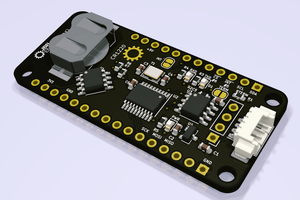
The main components are:
- U1 AHHCY6 DCDC regulator
- U2 1117 3,3Volt Low Dropout Voltage Regulator
- U6: TS3A24157 2-Channel SPDT Analog Switch
- U7: SP3483, SO08, 3.3V Low Power Slew Rate Limited Half-Duplex RS-485 Transceiver
- U3: WCH CH432T SSOP20 SPI dual UART
- Y1: 22.1184 MHz Quarz (for U3)
- U8 Sipex SP2323EE True RS232 Transceiver
- U9: SP3483, SO08, 3.3V Low Power Slew Rate Limited Half-Duplex RS-485 Transceiver
- U4 Epson RTC R8010, I2C und 2x IRQ
- Q2: SOT23 702: 2N7002, N-Channel Mosfet
- Q1 NPN Transistor 1AM = MMBT3904L
- SS34 40V 3A Shottky Diode
- U12 TXS0102DCUR FE NZ dual Level shifter (3.3V <-> 5V)
- Diode CG_ TVS Diode 28V
- BAT54C SOT23 Marking TL3
- ESD Diode Marking AC: PESD5V0L1BA, Low capacitance bidirectional ESD protection diode SOD323
The IO Pins (on green terminals: 5V via 2x FE NZ) are:
- green LED: GPIO4
- IO0: GPIO17
- IO1: GPIO18
- IO2: GPIO27
- IO3: GPIO22
RealTime Clock:
- RTC SDA: GPIO2
- RTC SCL: GPIO 3
- RTX IRQ1: GPIO6
- Software:
2channel SPDT switch:
- COM1: UART0 TX
- COM2: UART0 RX
- IN1+IN2: via R34 to GPIO5
- NC1+NC2: not connected (via R44 + R45 to second channel of U8, option: move FB1+2 to FB3+4 and remove R48, R50, R53)
- NO1+NO2: SP3483 (RS-485) to B0/A0
- Software:
- set correct GPIO5 state
- use Raspberry UART with any modbus library
CH432T SPI DUAL UART (RS485 and UART via Raspberrys SPI Interface and CS0)
- INT: GPIO7
- SCS: GPIO8
- SDO: GPIO9
- SDI: GPIO10
- SCK: GPIO11
- Software:
- port 0 (RS485): GitHub - DFRobot/DFRobot_CH432T_raspberrypi
- port 1 (UART): ?
The terminal blocks have the imprints
- Power: 2EGT-5.08
- Data: 15EGT-3.5
Look Right
Here are my steps to keep the RTC working for the RocktechISG-502:
AS one comment here already mentioned, THE ADVANDTECH UNO-220 is a (most likely) identical device.
ther are drivers for all the extra functions we want to use. But only for an older OS version.
(there is a complete OS, too)
I used it as confirmation that the i2c adress is really 0x32 on for some config options.
First, I installed a fresh and up to date Raspian OS on an SD card and updated everything.
(for me, evertthing already was up to date..)
$ sudo apt update
$ sudo apt full-upgrade
Then, I added some stuff for i2c support:
You may find the appropriate steps at many places;
here is one I looked at:
https://pimylifeup.com/raspberry-pi-rtc/.
sudo apt install python3-smbus i2c-tools
I enabled i2c bus functions uisng raspi-config like:
sudo raspi-config
then, go to interface option and enable i2c.
Now, checked to see if I see the clock on the i2c bus:
i2cdetect -y 1
0 1 2 3 4 5 6 7 8 9 a b c d e f
00: -- -- -- -- -- -- -- --
10: -- -- -- -- -- -- -- -- -- -- -- -- -- -- -- --
20: -- -- -- -- -- -- -- -- -- -- -- -- -- -- -- --
30: -- -- UU -- -- -- -- -- -- -- -- -- -- -- -- --
40: -- -- -- -- -- -- -- -- -- -- -- -- -- -- -- --
50: -- -- -- -- -- -- -- -- -- -- -- -- -- -- -- --
60: -- -- -- -- -- -- -- -- -- -- -- -- -- -- -- --
70: -- -- -- -- -- -- -- --
This is the picture you want to see in the end if all is going well;
when you start, instead of UU you will see "32" here as the i2c bus device is not used yet.
We need to build a kernel module for RTC 8010.
To do so, I used this source code:
https://github.com/torvalds/linux/blob/master/drivers/rtc/rtc-rx8010.c
and follwed this article (it was surprisingly easy ;-))
https://www.raspberry-pi-geek.de/ausgaben/rpg/2021/06/treiber-als-kernel-module-kompilieren/
Each of the commands should run through without error messages.
As I tried to call hwclock as normal user; I always got an error. So I continued to look for an arror although
everything may already have been fine.
So, some of the next steps may be redundant or not needed.
I added an entry as last line in /boot/firmware/config.txt
(/boot/config.txt as found on some pages does not exist on my system):
dtoverlay=i2c-rtc,rtc-rx8010
and in /etc/modules:
i2c-bcm2835
i2c-dev
rtc_rx8010
I did the modprobe with those 3 modules
For the rtc module I was unsure if I should use rtc_rx8010 or rtc-rx8010; I think the latter worked.
You may want to look as well to lsmod and check if you see the rtc module.
And you may want to reboot and check again.
Finally, the NTP service to update time / date via network may not be needed / wanted.
To disable:
$ sudo systemctl stop ntp.service
$ sudo systemctl disable ntp.service
And the fake-hwclock is not needed any longer, too:
$ sudo systemctl stop fake-hwclock.service
$ sudo systemctl disable fake-hwclock.service
(you may as well want to uninstall this..)
I hope this works for you as well!
Best regards!
Volker