Close
0%
0%

Pink Noise Generator

Digital white noise with an analog "pink" filter

Public Chat
Similar projects worth following
I used an MCU as a white noise source using a 32-bit Linear Feedback Shift Register (LFSR). I passed it into a 3-stage high-shelf filter with offset frequencies to approximate a -3dB slope which is characteristic of pink noise.

The MCU is a MSP430G2231 which is extremely small and limited but it comes in a PDIP package and is easy to program (see my last project). It is well suited for this application because I only need 1 shift register, 1 output pin, and a 1 MHz clock is more than sufficient. Additionally, it operates at a low Vcc voltage < 3.3V which comes in handy if I want plug the final signal right into Line In.

For the pink noise filter, I considered the designs from the SyntherJack blog and decided to go for a passive design like in Thomas Henry's circuit. I initially wanted to add an LFO and VCA to the front like in Jack's Ocean Noise Generator but after testing it sounded kind of weird on its own so I scrapped it. My main goal from this project was to learn how the values for the shelf filters were chosen so I decided to derive the equations for them by hand.

Digital White Noise Generation

An LFSR is a shift register where some combination of higher bits are XORed together and pushed into the front of the register. It can be used to generate random numbers, or if it is polled fast enough it can create white noise. I found this website that lists a bunch of possible combinations that loop through all the possible combinations of bits. Since the MSP430 is a 16 bit MCU, initially I tried the 15 bit loop where you XOR the first and 15th bit and push that to the front. However, this had a really short cycle length and I could clearly hear the sequence repeating. I implemented a 32 bit version using two 16-bit registers in assembly, and for this sample code I'm using the 2nd bit and 21st bit (bit 1 and bit 20) ( 20 mod 16 is 4 therefore in practice I actually test bit 4 of the higher register).

I used the MSP430G2231 running at 1MHz and outputting to port P1 (couldn't be bothered to add the extra instructions to just output to one pin!)

while(1) {    
    // R10 and R11 together form the 32 bit register
    // Carry flag (C) is the least-significant bit of the status register (SR)
    asm("   BIT #2h, R10"); // C <- R10 AND 0b00000010 (bit 2)
    asm("   MOV SR, R12");  // R12 <- C 
    asm("   BIT #10h, R11");// C <- R10 AND 0b00010000 (bit 4 aka bit 20 of 32 bit value)
    asm("   XOR SR, R12");  // R12 = R12 XOR C
    asm("   RRC R12");      // C <- bit 0 of R12
    asm("   RLC R10");      // Rotate left through C
    asm("   RLC R11");      // Rotate left through
    asm("   MOV.B R10, P1OUT"); // copy R10 to P1OUT. P1OUT is configure so only P1.0 is an output.
}

Analyzing One Stage

Before that, though, I looked at the circuit analytically and tried derive the gain at DC and high AC values.
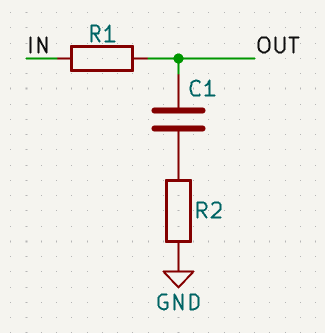
Figure 1: Basic high shelf filter schematic

If the input signal is DC, then C1 becomes an open circuit and no current flows through it. Therefore the output voltage is equal to the input voltage. If the input is high-frequency AC, then C1 becomes a short circuit (replace with a wire) and the output voltage is determined by the voltage divider created by R1 and R2:

Where A is the gain which is equal to the output voltage divided by the input voltage.

The next stages are mostly the same, but now you need to consider the effect of the previous stages (can use Norton's, etc). Overall, its possible to completely calculate this circuit with just the previously stated assumptions and calculating one stage at a time. Additionally, I didn't realize this in the beginning but you should also include the output resistor in your calculations. Since the output is not buffered, it will load the circuit and change the frequency response. I measured the input impedance (crudely) of my Line In jack to my PC and got a value around 24-32k, which pretty much aligns with Wikipedia's quoted theoretical 10k.

I did a bunch more math for...

Read more »

14-mine-240308_2202-glued.wav

Pink noise sampled from the Line In of my computer

x-wav - 1.31 MB - 03/14/2024 at 03:53

Download

  • 1 × MSP430G2231 Microprocessors, Microcontrollers, DSPs / ARM, RISC-Based Microcontrollers
  • 1 × A handful of resistors and capacitors

  • PWM Sine wave generator

    Stefan Antoszko10/12/2025 at 06:10 0 comments

    Last summer I backpacked along the west coast of Vancouver island. Sometimes I look back at the pictures I have of the vast shoreline, massive trees, and unique flora and fauna from that magical landscape. The pictures from that trip are pretty good, but when I really want to re-live those memories and feel like I'm back in my hiking boots, I sometimes listen back to a short 30 second voice memo of waves washing over a pebble beach that I recorded on my phone. This voice memo is one of the tools I'm using to help me along this project.

    When looking at the audio waveform of the voice memo, I was looking for the period of the waves (in seconds) and what kind of shape the waves were making. The recording is pretty short, it only captures about 4 waves, and there are really loud pebble-wave sounds that probably make the waveform a little fatter than it should be, but it looks like waves crash at around 5-10 second periods and their shape is surprisingly sinusoidal. That was not what I was expecting, I cannot lie.

    Anyways, I had a clever idea for generating the sinusoids on the microcontroller. Since I need the sine wave to move over time, I can just calculate it on the fly using sin/cos relationships! I thought that if I have two variables, one for sin[i] and cos[i], since calculus tells us that d/dt sin = cos and d/dt cos = -sin, then I can calculate the amount they both need to change to get sin[i+1} and cos[i+1]! Now I doubted this would work in practise because it seemed a little too simple, so I made a spreadsheet to quickly test out the idea, and it worked! But I still doubted it would work in practise because of integer precision and under/overflows so I implemented it on my host machine in python, then in C, then in C with integers, and it didn't really start breaking until I forced it to 8 bit integers in C. Here's the main idea:

    // I use _ before sin and cos to avoid redefining symbol errors
    
    uint16_t scale_nom = 1;
    uint16_t scale_denom = 60;
    
    // scale = scale_nom / scale_denom; // (I'm avoiding floats!)
    
    // initial conditions
    uint16_t _sin = 0x7000;
    uint16_t dcos = (int32_t)_sin * scale_nom / scale_denom;
    uint16_t _cos = 0;
    uint16_t dsin = (int32_t)_cos * scale_nom / scale_denom;
    
    // iteratively increment values with their deltas.
    for(int i = 0; i < n; i++) {
        _sin += dsin;
        dcos = -(int32_t)_sin * scale_nom / scale_denom;
        _cos += dcos;
        dsin = (int32_t)_cos * scale_nom / scale_denom;
    }

    GIven:


    Assuming its the first iteration, the first line in the for loop updates sin by 0. Then, line two calculates dcos, or how much cosine will change next. dcos is equal to -sin times a small change in time, and I use a fraction scale=scale_num/scale_denom where scale_demon >> scale_num for smooth outputs. After updating dcos, we can increment cos += dcos, and lastly calculate dsin from cos * the same scale.

    In my code, I call dt `scale` and calculate it as `scale_num / scale_denom`.


    The effect of the scale on the output is that the smaller scale is, the smoother the output will be, and at the same time, the longer the period. I discovered some interesting behaviours when testing out this piece of code. The algorithm often overshoots the initial condition, so I give it a little headroom (0x7000 instead of 0x7fff). Additionally, cranking the scale to be not-so-small (over 0.5) makes it overshoot more, so for real sines its best to keep scale<0.5 but out of curiousity I tested what would happen if we cranked it above 1. For a while, it looks ok, but then after around 2 it starts looking pretty chaotic.

    Signal and FFT when scale = 1/60 (0.0083)
    Signal and FFT when scale = 1/60 (0.0083). Nice and clean!
    Signal when scale = 1.6
    Signal when scale = 1.6. Starting to get a little deformed.
    Signal when scale = 1.95
    Signal when scale = 1.95. Uh oh!
    Chaotic signal at scale = 2.03
    Chaotic signal at scale = 2.03
    Chaotic Signal and FFT when scale = 2.05
    Chaotic Signal and FFT when scale = 2.05. The noise has a pretty gnarly frequency profile so it would probably not make for a good noise source. But it may sound good for nasty metallic...
    Read more »

  • Swing-Type VCA

    Stefan Antoszko10/04/2025 at 20:25 0 comments

    Today I programmed the DAC on my Seeeduino XAIO SAMD21 to output a slow triangle (ish) wave and used that signal to modulate the amplitude of the white noise. I used a swing-type VCA as shown below, which is rarely used because it heavily distorts (clamps) the input signal, but in this case the input signal is already a square wave so its perfect for this application. I coupled the output through a capacitor, and biased the input transistor at half the rail voltage (written 3.3, but its actually 5V from the USB-C cable, pin 14) Honestly, after looking at it again I don't think this is optimal nor necessary, I could've just buffered it straight and coupled the output to the headphones. Also right now, the output to headphones would be floating around 2.5V, and the headphones ground is 0V, so there will be a hefty DC bias on the headphones, which may not be ideal. I didn't head any pops or clicks when connecting though, so maybe its ok. Improvements needed, but it works.

    Next time I will try improving this circuit and improve the Arduino code as well. I'm thinking of making 2 pink noise sources (Waves R+L) and 2 white noise sources (wind R+L), meaning 4 amplitude CVs, so I will need to try PWM CV instead of DAC. WInd source should reach around 4Hz for details but otherwise around 10-20s period. Waves around 10s period with a little swell shape __...-~-...__


    uint8_t downscale = 2;
    
    // Called in timer ISR, around 93KHz
    void do_analog() {
      static int8_t delta = +1;
      static uint16_t y = 0;
    
      y += delta;
    
      if(delta == +1 && y == (1 << (10+downscale)) - 1) {
        delta = -1;
      } if(delta == -1 && y == 0) {
        delta = +1;
      }
    
      analogWrite(0, y / (1<<downscale));
    }

  • First log of many

    Stefan Antoszko10/03/2025 at 01:56 0 comments

    I was about to give up for the day on this project. Just after compiling and uploading, my VS Code was using up all my CPU and slowed my whole system to a near halt. Since my music also stopped, I pulled out my phone (brutal mistake) and connected to Spotify. I briefly glanced at my YouTube home page and nearly got sucked into endless scrolling, functionally calling the productive session to a close. But I remembered the conversation I had with my coworker earlier today: the goal is to actually finish this project. Immediately, I new what I had to do. I needed to stop trying to figure out a new development environment in VS Code that would allegedly give "lower level control" and other false-benefits, and crack open the old dusty Arduino IDE and just get 'er done!

    Today around lunchtime, I got a notification on my phone. The package I ordered from Digikey -- nothing fancy, just some simple microcontrollers and a few other nicknacks -- was delivered to my house. For the rest of the day, I was hopping in my chair and itching to tell anyone about my new embedded project I had waiting for me at home. The main sentiment that I shared in today's conversations was that I never complete projects, and this time that would change. The usual reasons I don't complete projects are because the goal of the project is to have fun learning about the topic, I allow myself to get sucked into niche technical problems, and enjoy the challenge of figuring out how things work under the hood. Ultimately, this exploratory mindset results (for me) in lots of deep-dives into rabbit holes that are interesting in the short-term, probably further my understanding of the topic at hand but don't actually really make any progress to completing the project. This is all fine and good for a while, but after spending, like, 6, 7, years with technical hobbies and the only thing to show for it being a cheeky "I learned a lot of stuff", it leaves a little more to be desired. Now I am driven to build something by sheer lack of past results, start to end, have it work, be able to show it off and prove to myself that I have follow through. And the project that I will do this with is a pink noise relaxation device, the one I started with this blog post nearly a year ago.

    The main ways I will actually complete this project:

    • Tell everyone I know that I am working on it and that I will finish it to stay accountable (outsourcing, to some degree :) )
    • Do the least effort to get the best result. Prioritize WORKING over PRETTY/FAST/OPTIMAL/whatever.
    • Don't get bogged down with nonsense.
      • Pick the tried and tested tools for the job that will get it complete quickly before I burn out.
      • Have clear goals, measures of success, deadlines. Reject feature creep.
      • Don't go off on exploratory tangents to figure out how something works.
      • If it ain't broke, don't fix it <---- SUPER IMPORTANT!!!

    Today, I booted up Arduino IDE, vibe coded a timer register setup, stole my own LFSR code from a year ago, and listened to the resulting white noise through two series 330 ohm resistors into cheap (disintegrating) wired headphones. Does it work? Yup. Am I proud of it? Not yet. Will this work style result in a real finished product some day? Only time will tell...

View all 3 project logs

Enjoy this project?

Share

Discussions

Similar Projects

Does this project spark your interest?

Become a member to follow this project and never miss any updates